.svg?width=93&quality=80&auto=webp&format=auto&cache=true&immutable=true&cache-control=max-age%3D31536000 "Home")


.svg?width=7&quality=80&auto=webp&format=auto&cache=true&immutable=true&cache-control=max-age%3D31536000 "Top Navigation - Sign in - Icon")


Don't take the bait
How to spot phishing and social engineering scams
How to Avoid the Phisherman’s Net
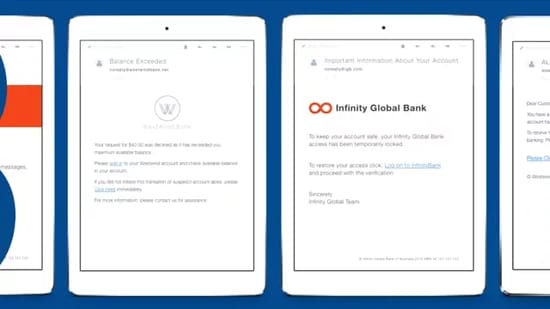

We see them every day: emails, calls, and instant messages asking for access to your computer, your personal information, data that needs to be protected. Sometimes these thieves ask for passwords, account numbers, or personal identifying details; other times, they want you to run a malicious attachment or visit a dangerous website to pick up some malicious code.
Remember: technology isn’t perfect. There’s no infallible solution able to prevent all attacks. Part of the responsibility falls on the end user – you – to know when to be suspicious, and to know how to protect yourself.
The first thing to know about phishing? If it smells “phishy,” there’s a good chance it is. Trust your nose. If you’re not sure, look for advice – don’t be afraid to approach your IT security expert. And yes, you can mark phishing emails as spam and ignore them, but it can be helpful to IT security to see new messages and help raise awareness to your colleagues that such a message is making the rounds.
Browser-based exploits are still pretty common, also. Even a fully-patched system can be compromised by visiting the wrong website. It’s always safer to just not click on a link if you’re suspicious. And be aware that it’s not just email you’ll need to watch out for. Thieves make use of instant messenger programs, texts, and even plain old telephone calls to try to gain access to your private information.
Telltale signs of phishing
There’s an infinite variety of phishing emails out there, in all shapes and sizes, but fortunately there are some “tells” you can look for to help suss out potential scams.
- It just doesn’t look right. Does the message claim to come from someone you do work with, such as a client, your bank, a social networking site, or even your own company, but there’s something a little off about it? Trust your instincts.
- Generic salutations. Instead of directly addressing you, phishing emails often use generic names like \"Dear Customer.\" This is because phishing emails are often sent out in large batches, and using impersonal salutations saves time.
- Links to official looking sites asking you to enter personal information or confidential data. These spoofed sites are often very convincing, so be aware what information you’re being asked to reveal.
- Unexpected emails that use specific information about you, like job title, previous employment, or personal interests. This information can be gleaned from social networking sites like LinkedIn to make a phishing email more convincing.
- Emails asking you to take action quickly. Thieves often use unnerving calls to action (such as saying your account has been breached) to trick you into moving fast without thinking, revealing information you ordinarily would not.

