.svg?width=93&quality=80&auto=webp&format=auto&cache=true&immutable=true&cache-control=max-age%3D31536000 "Home")


.svg?width=7&quality=80&auto=webp&format=auto&cache=true&immutable=true&cache-control=max-age%3D31536000 "Top Navigation - Sign in - Icon")


In this release:
- Sophos Protected Browser Extension
- Invite users to self-install the Protected Browser
Now Available
The Sophos Workspace Protection team is pleased to announce the new Sophos Protected Browser Extension, which works with Chromium Browsers on Windows and Macs (such as Chrome and Edge) to make it easier than ever to take advantage of the added security and controls it provides for apps and data.
Why an Extension - Protect the Browser You Already Use
For many of your customers, the benefits of a protected browser are clear: stronger control over corporate data, visibility into generative AI and shadow AI usage, protection against modern web threats, and just a better, more secure foundation for hybrid and remote work.
But some of you have told us that customers may not feel that it’s practical to replace their existing browser – at least initially.
That's why we're excited to introduce the Sophos Protected Browser Extension.
The new extension allows you to offer much of the policy enforcement, governance, and data protection capabilities of the full Sophos Protected Browser directly into customer’s existing Chromium-based browsers, including Microsoft Edge and Google Chrome, on both Windows and Macs.
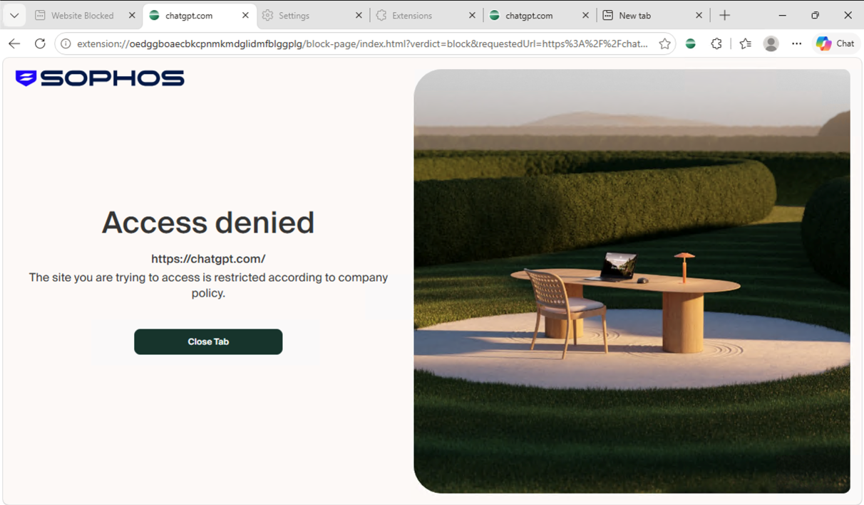
Get visibility into shadow IT and GenAI and then block unsanctioned apps, and allow only preferred sanctioned apps
What it Does
The Sophos Protected Browser Extension can enforce many of the policy actions that the full Sophos Protected Browser supports.
Admins can apply web and application policies across both deployment models, providing a consistent management experience and ensuring that users receive the appropriate controls regardless of how they access applications.
Capabilities available through the extension include:
- Application and website policy controls
- Data boundary controls, including copy and paste restrictions
- File upload and download controls
- Identity-provider-based browser enforcement
This allows customers to begin governing how data moves among their applications, AI services, and unmanaged destinations without requiring a new browser to be deployed.
As you might expect, a browser extension cannot offer the full capabilities of Sophos Protected Browser - these are some of the added capabilities you get with the full Sophos Protected Browser:
- Hardened browser that is more resilient to browser-based attacks and credential theft
- Built-in browser clients for RDP and SSH with full policy control
- Built-in ad blocker
- Data boundary controls are supported with the extension, except for screen capture and recording controls, which are only available with Protected Browser.
- Device Posture can check for Sophos Endpoint protection; however, the Synchronized Security heartbeat status is only available with Protected Browser
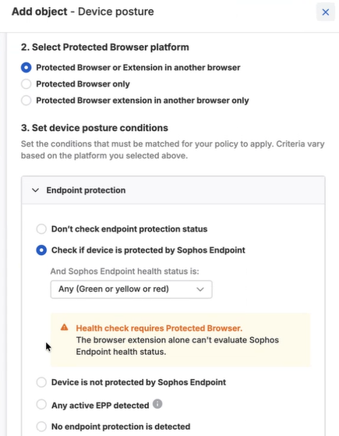
Easily setup device posture checks for access policies with just a couple of clicks
Use the extension, the full browser, both, or transition over time.
The Sophos Protected Browser Extension provides a super easy and flexible way to begin gaining visibility into activity while protecting users, applications, and data.
It enables a new deployment model that paves the way towards the full Sophos Protected Browser experience when your customers are ready. Instead of deploying the full Sophos Protected Browser to every user initially, they can start by managing and getting visibility from their existing browsers, then gradually expand Sophos Protected Browser usage to business-critical applications as they become familiar with the solution.
They can define policies that determine when a user can remain in their existing browser and when they must use the full Sophos Protected Browser.
For example:
- General web browsing can continue in Chrome or Edge
- Internal business applications can remain accessible through the extension
- Highly sensitive SaaS applications can require the full Protected Browser
- Users attempting to access protected resources can be automatically redirected to the full browser experience
The extension deployment supports a strong hybrid operating model and a clear migration path to Sophos Protected Browser.
Whether your customers are ready for a full Protected Browser deployment or just taking the first step to protect existing browsers, the extension provides an easy path to protection. The extension can redirect users to the Sophos Protected Browser should they ever need it.
Get started today
The Sophos Protected Browser extension is available to all Sophos Workspace Protection customers at no extra charge. Make sure your customers are aware of it.
They can download everything they need to deploy it in their environment by going to My Environment > Installers in Sophos Central, then selecting the Workspace Protection section.
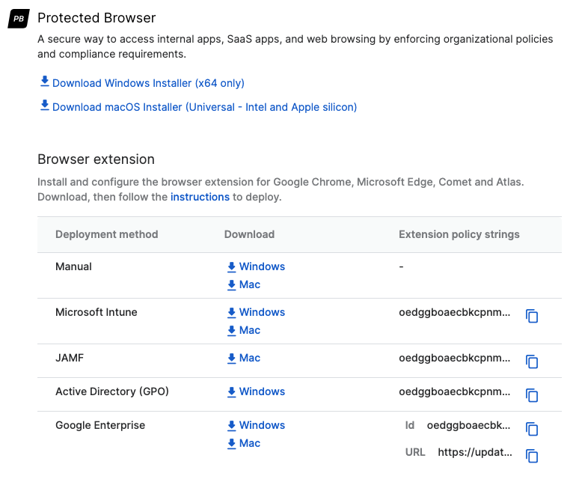
Download then new browser extensions from Sophos Central
Invite users to self-install
Self-setup emails make it easier to deploy Sophos Protected Browser. Invite users to install it, and they’ll receive an email with the browser installation link. This option is especially useful for BYOD, contractor, and guest access scenarios.
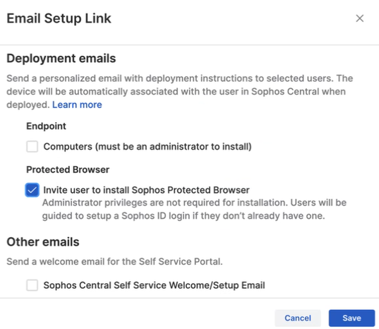
Easily invite users to install the Sophos Protected Browser
Learn more about Sophos Workspace Protection.
If you’re new to Sophos Workspace Protection and the Sophos Protected Browser that’s included, be sure to see what it can do to help secure your apps, data, workers, and guests, no matter where they are, with our useful TechVids How-to Videos and Helpful Use Case Series.
Visit the partner portal for product resources, sales playbook and training.