.svg?width=93&quality=80&auto=webp&format=auto&cache=true&immutable=true&cache-control=max-age%3D31536000 "Home")


.svg?width=7&quality=80&auto=webp&format=auto&cache=true&immutable=true&cache-control=max-age%3D31536000 "Top Navigation - Sign in - Icon")

Use the extension, the full browser, both, or transition over time
The Sophos Protected Browser Extension provides a super easy and flexible way to begin gaining visibility into activity while protecting users, applications, and data.
It enables a new deployment model that paves the way towards the full Sophos Protected Browser experience when you’re ready. Instead of deploying the full Sophos Protected Browser to every user initially, you can start by managing and getting visibility from your existing browsers, then gradually expand Sophos Protected Browser usage to business-critical applications as you and your users become familiar with the solution.
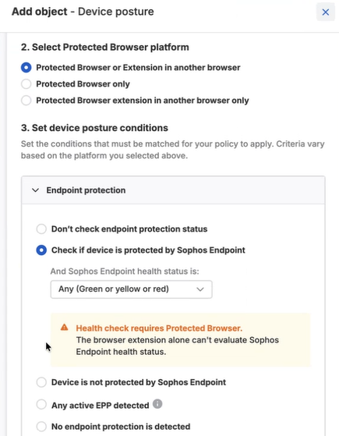
You can define policies that determine when a user can remain in their existing browser and when they must use the full Sophos Protected Browser.
For example:
- General web browsing can continue in Chrome or Edge
- Internal business applications can remain accessible through the extension
- Highly sensitive SaaS applications can require the full Protected Browser
- Users attempting to access protected resources can be automatically redirected to the full browser experience
The extension deployment supports a strong hybrid operating model and a clear migration path to Sophos Protected Browser.
Whether you're ready for a full Protected Browser deployment or just taking the first step to protect existing browsers, the extension provides an easy path to protection. The extension can redirect users to the Sophos Protected Browser should you ever need it.
Get started today
The Sophos Protected Browser extension is available to all Sophos Workspace Protection customers at no extra charge.
You can download everything you need to deploy it in your environment by going to My Environment > Installers in Sophos Central, then selecting the Workspace Protection section.

Download the new browser extensions from Sophos Central
Invite users to self-install
Self-setup emails make it easier to deploy Sophos Protected Browser. Invite users to install it, and they’ll receive an email with the browser installation link. This option is especially useful for BYOD, contractor, and guest access scenarios.

Easily invite users to install the Sophos Protected Browser
Learn more about Sophos Workspace Protection
If you’re new to Sophos Workspace Protection and the Sophos Protected Browser that’s included, be sure to see what it can do to help secure your apps, data, workers, and guests, no matter where they are, with our useful TechVids how-to videos and helpful use case series.