
The Ultimate Security Package
Proven protection for your network – simpler, faster, better.
Deep Learning Protection
Sophos UTM drives threat prevention to unmatched levels. The artificial intelligence built into Sophos Sandstorm is a deep learning neural network, an advanced form of machine learning, that detects both known and unknown malware without relying on signatures.
Sophos UTM 9.4 is one of the first Sophos products to offer our advanced next-gen cloud sandboxing technology.
Sandstorm provides a whole new level of ransomware and targeted attack protection, visibility, and analysis. It can quickly and accurately identify evasive threats before they enter your network. Sandstorm is:
- Easy to try, deploy, and manage
- Effective at blocking evasive threats
- Simple and powerful cloud-based protection
And, it’s tremendous value: it’s enterprise-grade protection without the enterprise-grade price-tag or complexity.
We keep it simple
Sophos UTM's simple, intuitive user interface (UI) is designed for you. It lets you quickly protect your network and users. And it makes day-to-day management tasks easy.
Simple management
Simple management
Sophos UTM is easy to use thanks to the configurable real-time dashboard, flexible modular licensing, and intuitive reusable network object definitions..
Network protection
Network protection
Easily configure firewall rules that cover multiple destinations, sources, and services – plus country blocking and intrusion prevention (IPS).
Web protection
Web protection
Check out the web protection deployment options, policy settings, filter action wizard, policy test tool, and convenient built-in web reports.
App control
App control
Easily control web applications proactively or in real time using the popular flow monitor where you can block, shape, or throttle web application traffic on the fly.
Advanced Threat Protection
Advanced Threat Protection
Advanced Threat Protection (ATP) features include multi-layered protection, selective sandboxing, and the ability to identify infected hosts on your network.
Connecting remote offices
Connecting remote offices
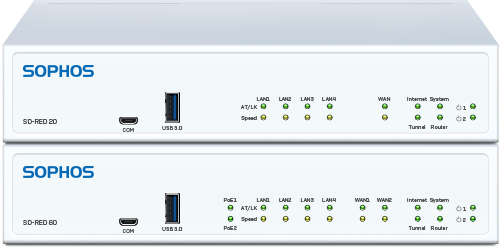
Easily deploy and configure our unique SD-RED devices to securely connect remote offices to your primary network security appliance.
All-in-One Protection
We offer the latest next-gen firewall protection you need, plus features you can't get anywhere else – including mobile, web, endpoint email encryption, and DLP. No extra hardware. No extra cost. Simply choose what you want to deploy.

Network Protection
All the protection you need to stop sophisticated attacks and advanced threats while providing secure network access to those you trust.
Network Protection
All the protection you need to stop sophisticated attacks and advanced threats while providing secure network access to those you trust.
Features
- Network Firewall
- Intrusion Prevention System
- Advanced Threat Protection
- Secure VPN Access
- Site-to-Site VPN
- Self Service User Portal

Wireless Protection
Set up, manage and secure wireless networks in just minutes with the UTM’s built-in wireless controller that works with our full range of wireless access points.
Wireless Protection
Set up, manage, and secure wireless networks in just minutes with the UTM’s built-in wireless controller that works with our full range of wireless access points.
Features
- Plug and Play Deployment
- Multiple Wi-Fi Zones
- Reliable High-Speed Wireless
- Mobile NAC
- Guest Wi-Fi Hotspots
- Secure Encryption

Web Protection
Comprehensive protection from the latest web threats and powerful policy tools ensures your users are secure and productive online.
Web Protection
Comprehensive protection from the latest web threats and powerful policy tools ensures your users are secure and productive online.
Features
- Web Malware Protection
- URL Filtering Policies
- SafeSearch, YouTube, and Google Apps
- HTTPS Scanning
- Layer-7 Application Control
- Web in Endpoint

Sandstorm Sandboxing
Sandstorm provides a whole new level of targeted attack protection, visibility and analysis. It can quickly and accurately identify evasive threats before they enter your network.
Sandstorm Sandboxing Protection
Sophos UTM 9.4 is one of the first Sophos products to offer our advanced next-gen cloud sandboxing technology.
Sandstorm provides a whole new level of targeted attack protection, visibility, and analysis. It can quickly and accurately identify evasive threats before they enter your network. Sandstorm is:
- Easy to try, deploy, and manage
- Effective at blocking evasive threats
- Simple and powerful cloud-based protection
And, it's tremendous value: it’s enterprise-grade protection without the enterprise-grade price-tag or complexity.

Email Protection
Full SMTP and POP message protection from spam, phishing and data loss with our unique all-in-one protection that combines policy-based email encryption with DLP and anti-spam.
Email Protection
Full SMTP and POP message protection from spam, phishing, and data loss with our unique all-in-one protection that combines policy-based email encryption with DLP and anti-spam.
Features
- SPX Email Encryption
- Standards-based Encryption
- Data Loss Prevention
- Live Anti-Spam
- Self-Serve Quarantine
- Outlook Add-in

Web Server Protection
Harden your web servers and Microsoft Enterprise Applications against hacking attempts while providing secure access to external users with reverse proxy authentication.
Web Server Protection
Harden your web servers and Microsoft Enterprise Applications against hacking attempts while providing secure access to external users with reverse proxy authentication.
Features
- Web Application Firewall
- Server Hardening
- Reverse Proxy Authentication
- Anti-virus Scanning
- SSL Offloading
License our protection modules individually or choose one of our pre-packaged licenses.
Logging & Reporting
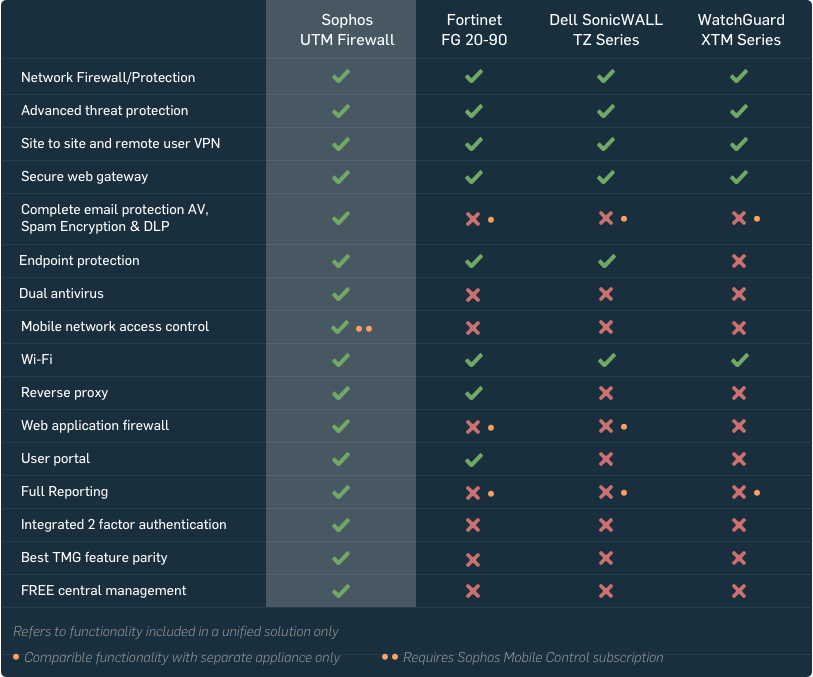
Our built-in reporting means you'll know exactly what's happening with your users. Fix problems fast and shape your policies, keeping your users secure while boosting network performance. And, you get detailed reports as standard, stored locally with no separate tools required.
- At-a-glance flow graphs show usage trends and web activity
- Our daily summary executive report keeps you informed
- Report anonymization can hide user names where needed
- Built-in Syslog support and automated log backup options
Need More Reporting?
Although you can have all your logging and reporting built in to your box, sometimes you may need a little more. For that, you can add Sophos iView.
Flexible Deployment
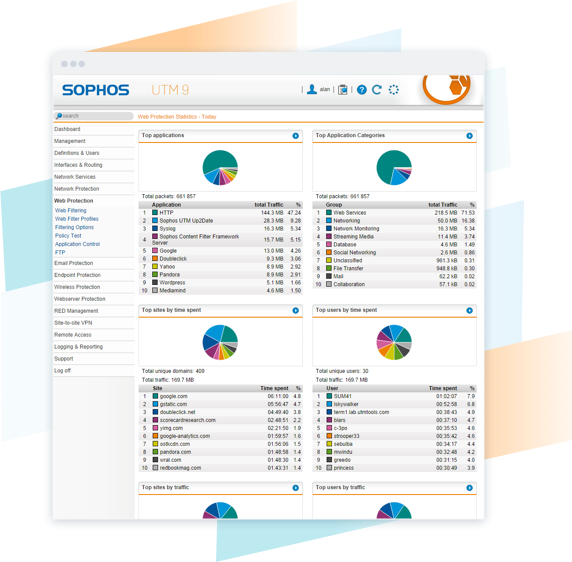
Sophos UTM is unmatched in its deployment flexibility: choose from hardware, software, virtual or cloud with simple options for high-availability, clustering, branch office connectivity, wireless, and centralized management and reporting. And unlike our competitors, we don't make you compromise on features or performance when you choose - every feature is available on every model and form-factor.

SG Series
Our SG Series hardware appliances are purpose-built devices with the latest technology to provide the ultimate in performance.

Software & Virtual
Install the UTM image on your own server hardware or your preferred virtual environment including VMware, Citrix, Microsoft Hyper-V and KVM.

Cloud
Sophos UTM is an industry leader and a preferred solution for securing Amazon Web Services network infrastructure.